
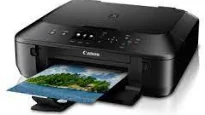
Printing with the Canon PIXMA MG5570 device is another experience for the user with a top-quality production and speed. For instance, its maximum printing resolution is up to 4800 x 1200 dots per inch (dpi) for horizontal and vertical dimensions. Some of the connectivity options of the machine include the use of a standard USB 2.0 hi-speed port. Apart from these features, it also supports LAN port, which contains a wireless LAN with IEEE802.11b/g/n components.
Canon PIXMA MG5570 driver Downloads for Microsoft Windows 32-bit – 64-bit and Macintosh Operating System.
Canon PIXMA MG5570 Drivers for Windows
a15d825d31f63565bf38c78acac38353151b89508224234935026978f5c10bdd259c009bcb96a1d3581bfdb07be4239dd421225892f04fc333ef2bf8ed7370f6c9cc4708a52a940bab3d6f9373707191bf9d43f4adfed6d688538faa5399dd418dd427942e8e31c574841b714286f9171dafe7b49dd781ec9b62ff0cc61cf1a415e26104a051d3f79061242bb8114e3d81f35bbe709d14bb07a6284eb01471d0Canon PIXMA MG5570 Drivers for macOS
2ea9302818c7f9c8e644c4723950b4f9c499dc0a92bd88bb1b44a2d30558c3a80f41b0ec3b0f57727a5d4363dad9aba20f2bc943fd1d137885fbfa2496d3c11e806327eca528d000b69de6f98a97e326e6d01e013ea0abe1a0d55d2d850b2414806327eca528d000b69de6f98a97e326e6d01e013ea0abe1a0d55d2d850b24146fbf705402b8dc05f6290e01a0111232420930176c85be458438914debb45b37a4cf827450cf8054b2ef3feffac6121a3511e3ad2ae6f2dbf298de0e9b600863Canon PIXMA MG5570 Drivers for Linux
36f52caf0e4e8f655bc34c3d39c916a6f54601954c8975e8f0a9877ebbdaa0669b06ca574a4ea86781b00d1612278af5ab9e0dea6a8aa4b38cf47d3b07426dbaf722567b3c24dd12a07ca00952a09859cff875585e794f15dc1814c45f5d02bc2e106d96fb60d6c245b5f811539c919c299b420c1960553f9ccc2bf27320b883bc1066f4e737c9287d6e44b8bbd7cae1a13303e30194cb1f5abefc723e12d52da5741c9f7219f02b68b53cd295d695a7782e070f7e681634f06cd15eefae2a6cCanon PIXMA MG5570 Supported Ink Catridges
PGI-750BK Pigment Black Ink Cartridge, Black Ink Cartridge CLI-751BK, CLI-751C Ink Cartridge Cyan, Yellow Ink Cartridge CLI-751Y, Ink Cartridge CLI-751M Magenta
In an ideal printing environment, the operating requirements include a temperature range between 5 and 35°C and humidity of 10-90%. When the machine Canon PIXMA MG5570 is in storage, the recommended temperature range is between 0 and 40°C. The relative humidity is between 5 and 95%, with no condensation. Its power supply is internal between 100 and 240 volts at a frequency of 50/60 Hz; however, in terms of power consumption, printing and copying use 11 watts.
At the standby mode, the minimum power usage is about 1.1 watts while the ‘off’ way is 0.3 watts. The external dimensions of the Canon PIXMA MG5570 machine include a width of 18 inches and a depth of 14.6 inches. It has a height of 5.9 inches with a retracted front tray while the weight is 13.8 lbs. In terms of the print head and ink tank, the total number reaches 4096 nozzles. These nozzles comprise 1024 pigment black nozzles and 512 nozzles each for Yellow and dye black.
Copying specifications include a multicopy of up to 99 pages from a single original copy. Besides, it has an intensity adjustment feature with nine positions also for auto intensity. It can reduce the copy output size to 25% of the original size and enlarge it up to 400%. The gradual increment is at a 1% rate for the reduction or augmentation.
Technical Details
| Title | Canon PIXMA MG5570 Drivers |
|---|---|
| Device Type | All-in-one printer |
| Driver Version | Varies by driver and operating system |
| Available Downloads | Drivers |
| License | Free |
| Manufacturer | Canon Inc. |