
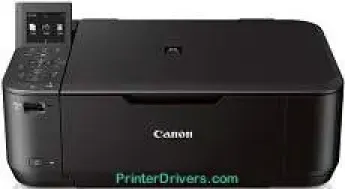
Canon PIXMA MG4220 has many impressive printer features, including an auto photo fix II, auto duplex print, calendar print, document printing, full HD movie print, and fun filter effects. Others may include my image garden, direct photo printing from memory card, photo printing, and Evernote.
Canon PIXMA MG4220 driver Downloads for Microsoft Windows 32-bit – 64-bit and Macintosh Operating System.
Ink Cartridge Details: Pigment Black Ink Cartridge PG-240, CL-241 Dye Color Ink Cartridge
Canon PIXMA MG4220 Drivers for Windows
b91944ac32e99d462f9dd0eba5119bc27d525ca489d61f95b5e23346f808026ba686a5878daf3741b9b923d3896aa73589abe13a3f18ec022860af55acc2a4a3817a1d639858cf105313779417ca2a3db6f9c4c0ec36653a27d2d81cb5bc7dd28dd427942e8e31c574841b714286f9171dafe7b49dd781ec9b62ff0cc61cf1a415e26104a051d3f79061242bb8114e3d81f35bbe709d14bb07a6284eb01471d0Canon PIXMA MG4220 Drivers for macOS
a3cba2d06d3654ae531f34b9440366e4763f032ed0295efd8393167fd74ccc53d9ebdfc4f21f0c33aae1fb31a65c858d73dff18ea6380d1261cd976640ed0c53ce488fb4af9825ebdb6fae448136acee6f322bbd38aa861f4134716aa1694651925500bfea88020e6ada8b117d368d7095519798328a2470e563f31ec1830cc1bcc571cac0044d013941b797ef8913055286469a3e15f49c860b9b9c58e9425c5ae7ef410baa2022bf6ce8b73cec13b79978dc5fa61a8f2cfa5f5b9a063c0aef598b52223c48528248077eebfd3c691465e0efbae2adc02ad1af101544533ce1a31025de43395706dd80c875af2e07fa0c5cdeebcf5621ea830361b22c138246Canon PIXMA MG4220 Specifications
On the other hand, there are mobile printing features, too, such as the Apple AirPrint, wireless printing, web template print, PIXMA cloud link, and mobile device printing. The main paper tray of this machine can also hold up to 100 sheets of plain paper. While copying color documents, the copy rate is approximately 20 seconds for the first-ever page.
The copy-related features include borderless reproduction, fade restoration, fit-to-page, multiple copies, frame erase copy, and photo reprint. Others include preset copy ratios, two-sided copy, zoom changes, borderless copy, auto exposure copy, and auto photo fix. The machine uses the flatbed scanner as a scanner, combining it with the contact image sensor (CIS).
Nevertheless, the scanner features that stand out include auto scan mode, attach to email scan, network scan, push scan, scan to the memory card, and wireless scanning. Simultaneously, its color depth is 48-bit for internal and 24-bit for external dimensions of scanning. It also has a maximum document size of 8.5 inches by 11.7 inches.
The available features related to printing include a 2.5-inch liquid crystal display (LCD) with a FINE cartridge hybrid ink system. It also has a creative park premium, dual color gamut processing technology, quiet mode, FastFront, and a quick-start feature. These features add up to the printer’s great value and mean a better experience for users.
The machine is compatible with the standard hi-speed USB port in terms of connectivity, together with card slots. Nevertheless, it also has a wireless LAN component with the IEEE 802.11b/g/n component.
Technical Details
| Title | Canon PIXMA MG4220 Drivers |
|---|---|
| Device Type | All-in-one printer |
| Driver Version | Varies by driver and operating system |
| Available Downloads | Drivers |
| License | Free |
| Manufacturer | Canon Inc. |