
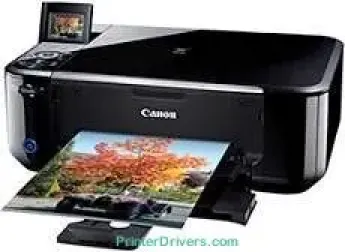
Printing with the Canon PIXMA MG4170 model produces a maximum resolution of 4800 x 1200 dots per inch (dpi). It also has the smallest ink droplet size of 2 picolitres (pl) from various types of compatible ink tanks. For example, the PG-740 ink tank model can produce pigment black printing while the CL-741 model is for dye C/M/Y. When using A4 paper, the Canon PIXMA MG4170 printer model can use PG-740 or the CL-741 cartridges to print up to 180 sheets each in color.
Canon PIXMA MG4170 driver Downloads for Microsoft Windows 32-bit – 64-bit and Macintosh Operating System.
Canon PIXMA MG4170 Drivers for Windows
182d3e0a66120d578fa3870434b3439f11527dbeb582fc902002c5c4282d89283c66677dc1085932f685638ce3cbcc15d53370067a89dd9090d28a011f3271ff1159069625a3f8ddc9c8fc623f667c6101bd36885f0f3a7e05f22f4acee07a8fb20f22d72b73fbc13909f51988138c4759cc04a91e277ed037263aa22b03c2676504a0337ad6f12d21a0d22d8185a181ab233c5ff0af5dcff4ed142685608abf40d1e263018308b04a02b63f8862e32e096c3ac0f66ae674fea59dcde7953950eefde66eab0e234f86fd23677b9fc69bf4972b70d8226d30d1d92c43c280215bCanon PIXMA MG4170 Drivers for macOS
8d1cf60bf5e9e844d2e5d47d7e600cbb700cd524fa12bd9ba5a9c50fe71ea727504fdf1434223e49f19398a63b8129dbd7309f0fba7fd0c249ff7459463bdecb276ac8b966d6f730c2bd491dd2acf844bed4bf42735942f1c7501942188678ef11c74db2151099fabecd7930936b83b00f495766039e5efbd0b05552f0d1da9d46f2ee20e30775cc10b101c189700f18b5a8386f688a1fa939ff7cd3b9f2a6a35676576ac59bcf010230b04e385525a8eaa737c040a6f5f502735a087016c3ffcde4c23e7168048dabfdef7215cf733af704d89d2d2d875cd57e5ea436037ebeafce90154687048e62be46738988a2151bddaf932552ab95bd166aafb0bd5b86Canon PIXMA MG4170 Drivers for Linux
e1d82363c4ce21f266d07577861db7d85b553e2fe801ca947439781caead9bf97973c53a794fc9321b759d33f656c8947fdf3577396c5377343c4dca666becbb7e4f91a0aebfa32d75da046a20bab992bd6032bb2069cf0091e77d8119a489de11a406d5304285f782f872c79e99cbd5943562a925ce86d74805fa4306ae11a01f9fdcbd5139401b39fdf228cd4964caf282341c081b410d1b2a15dc1a50c77cfdb124ece506b73157914e5efecbd9da8542d5a0a77af83505c9a48a9952717bCanon PIXMA MG4170 Supported Ink Catridges
Pigment Black Ink Catridge PG-740, Cyan Yellow Magenta Colors Ink Catridges CL-741
Specifications
The printing rate with this device is up to 9.9 pages per minute (ppm) for black and white documents. But when printing in color, the speed is about 5.7 ppm on an A4 sheet. However, it is worth noting that these rates follow the ISO print standards. But when printing an 8 x 10 inch photo on A4 paper, the speed is approximately 90 seconds per page. If the photo size is 4 x 6 inches, borderless printing is 44 seconds per page.
The front tray of the machine can hold up to 100 sheets of plain paper. When scanning, the output resolution is about 1200 x 2400 dots per inch (dpi) for both photos and documents. The scanning process works with a CIS scanning element, while the color scanning speed is 14 seconds per page. On the other hand, while copying, the process rate is about 20 seconds for the first page. But continuous copying will take an average of 4.3 copies per page.
This multifunction machine has an operation panel with a liquid crystal display (LCD) that shows the printer status. Besides, the screen is about 2.4 inches in diagonal with several interface options. Such options include the USB 2.0 hi-speed port and a WiFi 802.11b/g/n component.
Technical Details
| Title | Canon PIXMA MG4170 Drivers |
|---|---|
| Device Type | All-in-one printer |
| Driver Version | Varies by driver and operating system |
| Available Downloads | Drivers |
| License | Free |
| Manufacturer | Canon Inc. |