
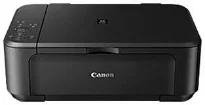
The multifunction printer is capable of wireless printing, scanning, and copying documents at excellent yield and speed. At the same time, it can produce a maximum resolution of up to 4800 x 1200 dots per inch (dpi). Even, it has a print technology that comprises 2 FINE cartridges, one each for black and color documents. This ink cartridge also has a print system with a minimum ink droplet size of 2 picolitres for best performance.
Canon PIXMA MG3540 Drivers for Windows
31e323509c4b5b463ae7a46517373a5d29048a7693c867ac5efa4e8705dc61cd957f27f0be22725885dc597c89999b1551e518cd09b8deee7cb0fdfa63c2e0818aa03314e3d6189c3dc7c7d61c26265e219083e7ff3957c7e37a26cf63698a328dd427942e8e31c574841b714286f9171dafe7b49dd781ec9b62ff0cc61cf1a415e26104a051d3f79061242bb8114e3d81f35bbe709d14bb07a6284eb01471d0Canon PIXMA MG3540 Drivers for macOS
4e13a59c6c20dfcf9fa23c3605898ab47430a90ed1fcf196acfa1f7cc67f2d41246b7f3c495cc9417f7697256ab6766e07b60783992628d3e3703e65d36e09643181a930a18df5a3a324414de19958b2b1228b071a99d33b3ff346e5cf372eff806327eca528d000b69de6f98a97e326e6d01e013ea0abe1a0d55d2d850b2414806327eca528d000b69de6f98a97e326e6d01e013ea0abe1a0d55d2d850b24140a9efe31c72dc6a940b3a903e5a52d15e3783df62499d1100c22aff8ab2b174aa4cf827450cf8054b2ef3feffac6121a3511e3ad2ae6f2dbf298de0e9b600863Canon PIXMA MG3540 Drivers for Linux
c03e6b9873e60ea677ead4fa3c8285b6e323d08517b92bb9f699d84a59aaaceb54d9a77e8ec5d0c948ea5924442ea8cfeb534ad18a43f6b4ecf344aaef322188f722567b3c24dd12a07ca00952a09859cff875585e794f15dc1814c45f5d02bcd4a14171a14c6221c40b589b90945512fbb0762ab4d43fb4bab48f4f858a63400fe5b7827b11d52754fc25ed26836b09342b588289b7b87ec2335ff7b9f179f6a5741c9f7219f02b68b53cd295d695a7782e070f7e681634f06cd15eefae2a6cPIXMA MG3540 driver Downloads for Microsoft Windows 32-bit – 64-bit and Macintosh Operating System.
Ink Cartridge Details
PG-440 Black Ink Cartridge – Approx 200 pages
Tri-Colour Ink Cartridge CL-441 – Upto 220 pages
Simultaneously, the compatible ink type is the ChromaLife100 ink, which is capable of producing excellent print quality. Monochrome or black and white documents run at a speed of 9.9 images per minute (ppm). Conversely, color speed runs at the rate of 5.7 ipm while borderless printing is 44 seconds per page. At the same time, borderless printing supports A4, letter, and photo sizes. The machine also supports auto duplex printing for A4 and letter-sized papers.
Canon PIXMA MG3540 printer model supports the use of two different cartridge models, PG-440 and CL-441 models. As options, users can also use the PG-440Xl and the CL-441XL models for higher production or yield. The standard cartridges can print 180 pages on black paper each. Whereas, the Black XL version will produce 600 pages while the color XL cartridge will print 400 pages. The yields above apply to the use of plain paper, photo print yield differs.
The scanner type is through the contact image sensor (CIS) flatbed document and photo scanner. This component can produce an optimum optical resolution of up to 1200 x 2400 dpi. Similarly, the approximate speed on A4 paper is about 14 seconds, while the scanning depth varies for grayscale and color. While copying, the first copy out time is approximately 22 seconds, while subsequent pages run at 2.7 ipm.
Technical Details
| Title | Canon PIXMA MG3540 Drivers |
|---|---|
| Device Type | All-in-one printer |
| Driver Version | Varies by driver and operating system |
| Available Downloads | Drivers |
| License | Free |
| Manufacturer | Canon Inc. |