
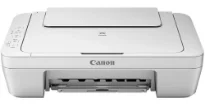
Some of the top extraordinary qualities of this machine include a high-quality photo and document print output. As a multifunction device, it carries exceptional print technology with a FINE print head. The optimum print resolution from the machine is up to 4800 x 600 dots per inch (dpi). In terms of speed, fast document printing runs at 8.4 images per minute (ipm) for black. On the other hand, color printing has a print speed of 4.0 ipm under normal circumstances.
Canon PIXMA MG2460 Drivers for Windows
0c2bedb29b8ea6fb7abae51b64537e1288de377763ae8baed1a197282b2ab97ca120fa8907a237415671a64549fca3a4ff9fdd782e545acb0786c0b3f72491f1813908589aaad81325dabfb058088e310594a66f4113fff6324826b1f38e688a8dd427942e8e31c574841b714286f9171dafe7b49dd781ec9b62ff0cc61cf1a415e26104a051d3f79061242bb8114e3d81f35bbe709d14bb07a6284eb01471d0Canon PIXMA MG2460 Drivers for macOS
3f4c9e95b3363f5fc0afc5c7ed0b78727f00fd4cbe78bfc4958dcb0b5fadc50b4ac89fb8d831cd67dfc408316ac83a7b798b61ebc4b92106779539a940924b0b1e44e19cd03e75da9b611cb11abac3c52eb73a65b8fb49c3277923cbfd7c8deb3181a930a18df5a3a324414de19958b2b1228b071a99d33b3ff346e5cf372effa54bd460370514da84d794fed154bcea9633285559c8e647ecc941e2000acce3806327eca528d000b69de6f98a97e326e6d01e013ea0abe1a0d55d2d850b2414806327eca528d000b69de6f98a97e326e6d01e013ea0abe1a0d55d2d850b2414c5d9d4e3007dceb1012d0e06637569765aba84416126622c24ed77b447b0fa93ebe548c44f78b0d7152c3b6a087de034f1ed4d7e0ab1ad1966032128d9c0c83cCanon PIXMA MG2460 Drivers for Linux
b4b76e5e225b58ff66b397ff3124dfbf36c12d443fcf14ce50e646b8e6376a8ab293a552e627d923a6be2039176f0dfc011b954ba574dce07c0dea476c4ed836f722567b3c24dd12a07ca00952a09859cff875585e794f15dc1814c45f5d02bcb3e292e4f9100f57d8e264116efead9006d49ec35ca877b570603222684213682a5fea7222f91ce969bf494eaef15116438ecadc0039aa52c134815c5b27e248a5741c9f7219f02b68b53cd295d695a7782e070f7e681634f06cd15eefae2a6cPIXMA MG2460 driver Downloads for Microsoft Windows 32-bit – 64-bit and Macintosh Operating System.
Ink Cartridge Details
Tri-Colour CL-646 Ink Cartridge
PG-645 Black Ink Cartridge
The connection of the printer to a computer is with the standard USB 2.0 hi-speed port. As a copier, the machine Canon PIXMA MG2460 can diligently reproduce copies through its dual color gamut technology for processing data. Besides, this component is usable even without connecting the device to a computer. Copying runs at a speed of 31 seconds on average for the first page. It also has multiple functions for up to 21 pages from a single original document.
Scanning with this Canon PIXMA MG2460 machine is possible through its flatbed contact image sensor (CIS). This mode will also run at a rate of 14 seconds with an optical resolution of 600 x 1200 dpi. At the same time, the scanning bit depth for input and output modes differs. For instance, grayscale mode produces 16-bit/8-bit depth, while the color mode has 48-bit/24-bit depth. Also, the maximum document size that this feature allows is the A4 paper size.
The machine has a width of 426 mm, a depth of 306 mm, while the height is 145 mm. Also, it weighs about 3.5 kg, which is convenient with its variety of use. Power usage is between a voltage of 100 and 240 for an AC with a frequency of 50/60 Hz. Drivers are available for Windows XP to Windows 11, macOS 10.6 to 13 and Linux in the download section on this page.
Technical Details
| Title | Canon PIXMA MG2460 Drivers |
|---|---|
| Device Type | All-in-one printer |
| Driver Version | Varies by driver and operating system |
| Available Downloads | Drivers |
| License | Free |
| Manufacturer | Canon Inc. |