
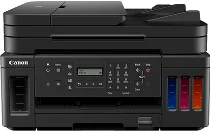
Canon PIXMA G7020 driver supports a wireless Megatank inkjet all-in-one or multifunctional printer. Similarly, the primary print functions include wireless, Ethernet, print, copying, scanning, faxing, and automatic document feeder (ADF). Other features include high page yield, mobile device printing, PictBridge or wireless PictBridge, and cloud link. Moreover, some ideal uses consist of home office or small office printing with high volume printing.
Canon PIXMA G7020 Drivers for Windows
6a5f52240616d5eff4cf93c1b872d62c860f7b2d6efd136efb4f6bf236ca83426ec4713fe7d6f8d388106604c2088fee73edfc6ff26da90bbc0bf5ffe6c73ff98dd427942e8e31c574841b714286f9171dafe7b49dd781ec9b62ff0cc61cf1a415e26104a051d3f79061242bb8114e3d81f35bbe709d14bb07a6284eb01471d0Canon PIXMA G7020 Drivers for Linux
a08be6cd4d6b2f07a32607756b86f73e3e77c6ab44fe75eacd26955a465e02aa619cff5497242c388bca5cc97eba83a4bc0550f2371ca4e80be1afa47b50f3cca35ae944efd3540d7250920296f16812118d9eb9f0031cdc1fe650cfac24ad03851f3f5cbd2fd04b2734c020a8c92f3e0da7814ef1d1eb6dad9a357f3d5fa97fdb943208d6a0248098ae70585e5820788187e7dab9933ac297e53fc16e6370f9e55e569b284695ab744c45822115f44d711e917e5cfc1c1be5892dc07d219b2bOther uses may include document or photo printing, borderless printing, wireless printing, scanning, faxing, and page copying. As for the first page, printout time depends on the print mode and paper type in use. Black and color documents run at 9.0 seconds and 14.0 seconds, respectively, especially for the letter-sized paper. On the other hand, printing on borderless photo paper of 4 x 6 inches has an approximate rate of 45 seconds.
The compatible print head includes a full-photolithography inkjet nozzle engineering (FINE) print head for color and black printing. Also, the user can easily replace any of these print heads when there is any need to. Canon PIXMA G7020 also supports a maximum of 1152 color nozzles and 640 nozzles for pigment black printing. Similarly, the total number of nozzles within this machine is about 1792. Also, it can produce a print resolution of up to 4800 x 1200 dots per inch (dpi).
As for the media handling, this machine supports a front paper cassette and a rear paper tray. Also, the ink system comprises a 4-color continuous ink supply system (CISS) and FINE print heads. Others include:
- A hybrid ink system.
- Integrated ink tanks. ‘
- Squeeze-free ink bottles for easy and mess-free ink filling.
- An extra-large ink absorber.
Also, the compatible ink types include GI-20 pigment-based black ink bottles and a set of equivalent dye-based color inks.
Technical Details
| Title | Canon PIXMA G7020 Drivers |
|---|---|
| Device Type | All-in-one printer |
| Driver Version | Varies by driver and operating system |
| Available Downloads | Drivers |
| License | Free |
| Manufacturer | Canon Inc. |