
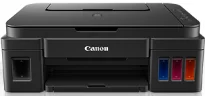
The Canon PIXMA G3400 printer model’s essential functions include Wi-Fi printing, copying, scanning, and cloud link. Simultaneously, the printer can produce a maximum print resolution of 4800 x 1200 dots per inch (dpi). It also works with a print technology with 2 FINE cartridges for black and color printing. Besides, there is also a refillable ink tank with a minimum ink droplet size of 2 picolitres. As a multifunction printer, this device can produce excellent output.
Canon PIXMA G3400 Drivers for Windows
6c64af98b9d71552c2477dfc81f46201b26dae6cd757c844a2a3ed963a54b8b3fc3127786394de09a93823031dfda71078468d7286fb9fe880b4a5576e1683cf505ce0e5211ea6cba6b23dd9b4bbfc6c47de48df69ddd972b67cce93b894f5c18dd427942e8e31c574841b714286f9171dafe7b49dd781ec9b62ff0cc61cf1a415e26104a051d3f79061242bb8114e3d81f35bbe709d14bb07a6284eb01471d0Canon PIXMA G3400 Drivers for macOS
d9ce54510e927ae0c77f906d176208eefea56817abd23d7fe0dbdae97a859a4910725712df7de9fe9446fbcfc55f78752be9386e3bc51ffff599ae2cafee9259521dffc7a38957c8a79ada27b932f52b9e8233caab9f696c20df51a7e0d3c0b43e239ef26f1ddcdb36e3f16285998a1e379c51301a3ee8525cf77f0f5b494a173e239ef26f1ddcdb36e3f16285998a1e379c51301a3ee8525cf77f0f5b494a17c70349786e1909788435c4da6eec8a8622fb71711807754a6a207c080e91d97b511df8199951cd3d48d92469449ac548989fe9c193a242788e3d2a509047e624Canon PIXMA G3400 Drivers for Linux
c734410e193a8f804762f74b1654c93c3edc86b89acb0985f70474896f1f0ab6efb7285486c00b883d00df36762448a786d3935c318ed68a6335092545b6c3b66a4dae55415f28b7f60f0c0e9761219007225f7a15748c6cd14b199917ff4e87a2b259b917843e101e87ec6a1f5893a5101223d527fe67393636f608de0dd623faa3787a330752849815775cfac08eaae801d3de5b2ba5df06049bea910b6304b78f1e6c9d6d38a6ef2a9ef04499bef67d4494ec98e55c9338c58b56ef60517fCanon PIXMA G3400 driver Downloads for Microsoft Windows 32-bit – 64-bit and Macintosh Operating System.
Ink Cartridge Details
Ink Cartridge GI-490 Black – Approx 6000 Pages
GI-490 Cyan Ink Cartridge – Yields upto 7000 Pages
Magenta GI-490 Ink Cartridge – Upto 7000 Pages
Ink Cartridge Yellow GI-490 – Yields upto 7000 Pages
In terms of the machine’s speed, monochrome printing runs at a rate of 8.8 images per minute (ipm). On the flip side, when printing in color, the printing speed is approximately 5.0 ipm. Simultaneously, the photo print speed is about 60 seconds on average, while using plain paper. The same borderless printing works for A4, letter, and photo sizes. Also, standard ink cartridge types include the GI-490 PGBK, C, M, and Y for pigment black, cyan, magenta, and yellow, respectively.
The A4 document printing through the main cartridge can produce up to 6000 black pages or 7000 color pages. These are rough estimations under ideal conditions. Some of the standard paper types include plain paper, high-resolution paper, and photo paper plus glossy II. Others include photo paper pro luster, photo paper plus semi-gloss, and glossy photo-paper “everyday use.” On the other hand, the Canon PIXMA G3400 model supports standard paper sizes such as legal, letter, DL envelopes, A4, A5, and B5.
The maximum paper input capacity of this printer is up to 100 sheets of plain paper. Besides, the standard paper sizes include A4, A5, B5, and photo sizes. This Canon PIXMA G3400 machine can work with a weight range between 64 and 105 gsm in terms of the paper weight. However, the device also supports the Canon photo paper of up to 275 gsm in weight.
Technical Details
| Title | Canon PIXMA G3400 Drivers |
|---|---|
| Device Type | All-in-one printer |
| Driver Version | Varies by driver and operating system |
| Available Downloads | Drivers |
| License | Free |
| Manufacturer | Canon Inc. |