
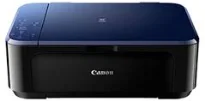
The Canon PIXMA E560 printer model is a particular device with its unique properties that add to its value. It supports the use of specific interface connectivity options such as the USB hi-speed 2.0 port. Other possibilities of connecting with this device include the Wireless LAN IEEE 802.11b/g/n component. Some of the mobile printing features that users enjoy with this machine include Google Cloud Print and PIXMA Printing Solutions.
Canon PIXMA E560 driver Downloads for Microsoft Windows 32-bit – 64-bit and Macintosh Operating System.
Canon PIXMA E560 Drivers for Windows
4ebcef102717b13d5827ca4f966b6d0bd9dd1ae70dc313da1138f8b7b84bc2ba82181de11c57f5e3b4caa9018fe7f9a43291a75b4751e121874406f73c656993191751e8cd04fdee8bc1ca5fe9bbc44b4a39d342349f8689d7ca5bba8208efc88dd427942e8e31c574841b714286f9171dafe7b49dd781ec9b62ff0cc61cf1a415e26104a051d3f79061242bb8114e3d81f35bbe709d14bb07a6284eb01471d0Canon PIXMA E560 Drivers for macOS
3987430c130e6ba7e5aae740766257c02972a0ee6a772434dbc18ab6ecdd16b01022d089b3d03545c002d53284b58dff8fb9435f1568b1d2f839e9a7a67104737f02520cec4672b856ebf42da2b85cd2b7f80a09804a5e2c18316f8c8953efb9a8340f792922d6d8ce58acfacaa640a184cc236d45f9f9eb85e6237117f0944442928550d450b28cfaf4be382dd2ae1c00234c035e47799e1c34bb840675e7934723d4cf96243560e9216345405cbd33273c50f9d1733a3335b1f562e2798759024035a5cbf24a9d9b82db99aafde9c1e3a339a56b59662d43ce4305b067c569a9a4a22da70ba75a36832647f6c442468e2234c8c198a6d0bf2ecd0794b89556Canon PIXMA E560 Drivers for Linux
aa604fa9090ff6b0efbd59df9a257181d57684d7f9bb4ecbb5ef4074576265744252641baa6e328c534ba443dc2d83f8503b725678f4427002b2a300bf0912060cff37fe6684dcfeb12a7350fb94cb5dda055b18c9987bbd32259320d46fc5984eafeb1b005373e3e8fc998589fabd430f6688df033aacbbd09cddf6550530c0715ab85ae9583bb637f90d79a326eaa562b43bb946d0c02c9a25a32b2cffb1b036ff9510b2ee30bcda7c7a49fa72583555fcd3ee5b8d023e40d8702c941531a1Canon PIXMA E560 Supported Ink Catridges
Colors Cyan, Yellow, Magenta Ink Cartridges CL-99, Pigment Black Ink Cartridge PG-89
In a healthy printing environment, the temperature used is between 15 and 30°C, while humidity is between 10 and 80%. On the flip side, the storage environment requires its specification. For instance, the temperature for storage should be between 0 and 40°C, and humidity should be between 5 and 95%. This Canon PIXMA E560 machine can produce a maximum acoustic sound effect of 42.5 dB (A) when using photo-sized paper.
In terms of the power specifications, the internal power source of this machine ranges between 100 and 240 volts. On the other hand, power consumption involves a standby mode using 1.7 watts of power. But when the device is in the ‘off’ mode, it uses about 0.3 watts while copying demands 16 watts. The Canon PIXMA E560 device is also compatible with the standards of usage in other countries. For instance, it works with RoHS in the EU, China, and the WEEE in the EU.
The physical dimensions of this printer include a width of 449 mm and a depth of 304 mm. The machine has a height of 152 mm, while the weight is about 5.4 kg. The Canon PIXMA E560 printer model supports several operating system versions. Drivers are available for Windows XP to Windows 11, macOS 10.6 to 14 and Linux in the download section on this page.
Technical Details
| Title | Canon PIXMA E560 Drivers |
|---|---|
| Device Type | All-in-one printer |
| Driver Version | Varies by driver and operating system |
| Available Downloads | Drivers |
| License | Free |
| Manufacturer | Canon Inc. |