
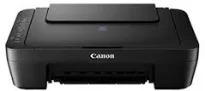
One of the notable features of the Canon PIXMA E470 printer model is its increasing scanning solution amidst other qualities. It also supports the fastest speed in the USB 2.0 hi-speed port on Windows PC with the different transfer time. The machine’s physical dimensions include a width of up to 426 mm, and depth is 306 mm. Note also that it has a height of up to 145 mm with a weight of 3.5 kg. This machine is also compatible with some other regulatory bodies in different countries.
Canon PIXMA E470 driver Downloads for Microsoft Windows 32-bit – 64-bit and Macintosh Operating System.
Canon PIXMA E470 Drivers for Windows
caf0ab8c6a4aedf353a5c6b606ee9e846f986eaf3da20574a42504f3fc4cd686716dde31543bac710dacd148b94ce113a7e3dc6e9857db3336752eb92016b7bef97b88d1eea1cdce60d727b581682678dc9d2026165a2ae74271f18f6d815b338dd427942e8e31c574841b714286f9171dafe7b49dd781ec9b62ff0cc61cf1a415e26104a051d3f79061242bb8114e3d81f35bbe709d14bb07a6284eb01471d0Canon PIXMA E470 Drivers for macOS
1cce2b0ed88d3b0c95fe9ab318d2fb6625348ad1fa5e3f917990df425f550fc5034dd6c84d31790db7610daa6c208c0d86ec51ac0683fa77d914695ab15d220986466428dfb09ab219d9cec5a95cc56a58517285c44eca62c455ecbdf9a817695f364309390bda740c4b7be8a1a87f77a8a1041593e3f9eff3660824ae48c2423acb2927d61e2fcc800bca3095ed16df3c0bea4f22768e2d0e78679cb2a1f0d905fd9c59ffd568e0c41d201e512443bdc7912d4404afb84f877bd377e5fa8c61Canon PIXMA E470 Drivers for Linux
3b298716ad8b806fad72ed52714838921dea6f84253446a02d0e669afbc13804559acc98851ecf86000724ee268b473818b395c6b87524dc0d82ead6263a6ab598ba823924fb7835d6f2697a2561e0e92c44b64fc10b6f8086a7bbbe5ee998eabb8d108b2c3557f3dc258d47b560ce96608a006ec7b052a630e0a5f911da2413da7fddf03d95b487b55795812c9a27a00aa027a8f3bbcc76ead54ce07108976bcfb2af683f1d1ed0431948967bae872798d8b75da9eac1bfbf30aa8394220ab0Canon PIXMA E470 Supported Ink Catridges
Ink Cartridges CL-57 Cyan, Yellow, Magenta Colors, Pigment Black Ink Cartridge PG-47
Some of the mobile printing features of this machine include the Google Cloud Print and the Canon Print Service Plugin. This particular feature is compatible with Android OS versions on mobile devices. It can also work with PIXMA Cloud Link for smartphones or tablets, which remains available to the device. Users may also want to explore the Canon Print Inkjet/SELPHY for iOS and Android OS versions and Canon Easy-PhotoPrint. The last feature works well for the devices using Windows RT.
This Canon PIXMA E470 model of the printer allows connection with a camera directly using the PictBridge compatible cameras. As a result, examples of such devices may include camcorders and some camera phones. Other ways of establishing a relationship with this device include the WLAN, which supports JPEG and PNG formats. The print layout uses a 1-up format, with support for Photo index and printing with shooting information with file number print.
When copying with this multifunction printer, the supported document sizes include A4 and letter. Also, the speed of copying is about 29 seconds per page for colored documents in simplex mode. The rate above refers to the first page of a copy, while subsequent pages run at 2.1 copies per minute. This machine can feature the multicopy mode with up to 21 sheets through just one original document.
Technical Details
| Title | Canon PIXMA E470 Drivers |
|---|---|
| Device Type | All-in-one printer |
| Driver Version | Varies by driver and operating system |
| Available Downloads | Drivers |
| License | Free |
| Manufacturer | Canon Inc. |