
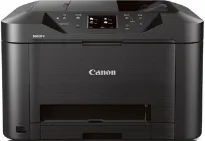
Canon MAXIFY MB5320 is a fantastic machine with excellent quality resolution and speed for a great user value. For instance, in the ESAT mode, black document printing has a rate of 23.0 images per minute (ipm). On the other hand, color document printing has an approximate speed of 15.0 ipm. It also contains 4352 nozzles, which comprise 3072 color nozzles and 1280 black document nozzles.
Canon MAXIFY MB5320 Drivers for Windows
b74be5b5d17dbf680bf11b888830d12e788a0dc327a2d093cecb47b4c692e3f1b0f84d65904a6426d6f1a0df2c47f0942028a34f903506e2fe743428da0a6c71c1a28d2e83aad822f431487c91bc1e9d89bf081da3d6e0b8442f4a0d857d509c8dd427942e8e31c574841b714286f9171dafe7b49dd781ec9b62ff0cc61cf1a415e26104a051d3f79061242bb8114e3d81f35bbe709d14bb07a6284eb01471d0Canon MAXIFY MB5320 Drivers for macOS
cfb9d98929d4244a3b5311238af98ace530f80727f91798379cdef63f553e96ed5b09d0d7b7f087d51fa263e7e1d00396ce99e087d7222108ae01ae69f85590f32a69059d3d8ce0a4dc45b2a7b288503803601bc9b38aea37c4c4fd3f76c87b71afeb535ed397255d08a42020061171252a1a3849ea8a8a96d7cfaa19ec0d7ac54a68698a1d61094604a984a129abaf719e3ab1b5d9b1019fa64906d934f424f8946a6442a6cae0e5642f76103e12a7bbc9855fe176f36a73fd5777f10b8e9a9Canon MAXIFY MB5320 Drivers for Linux
07a441231fa9e7cc7c32e1ef126916ab54945382facf01e68a00785beacebf92e5bbd191ec8b36a204cc2c8c2468d1ee1050ea53b68b304c5c268eda8537f51c42a5c9e956c701f88537471eb1054f38a293e3df4396cdb337c0c3ecdcaa5ae4015e689b9106804871be22771742a2c5046ee40f89bf856058036c909055bdf15482b5bac88cc7a857a527573de16a95c7bfae5d3fac9efd7c5dbd957cc59c8c468103a27a4bfeb20f9233c45f97afa807091ca97255b94b129402a00a56cb20Canon MAXIFY MB5320 driver Downloads for Microsoft Windows 32-bit – 64-bit and Macintosh Operating System.
Supported Ink Cartridges
PGI-2200 Black Ink Cartridge
Cyan Ink Cartridge PGI-2200
PGI-2200 Magenta Ink Cartridge
PGI-2200 Yellow Ink Cartridge
Also, the maximum print resolution is up to 600 x 1200 dots per inch (dpi). It is also compatible with the PGI-2200 cartridge model, which contains various colors, including Black XL, cyan, magenta, and yellow colors. This Canon MAXIFY MB5320 can work with legal, letter, US envelopes, photo sizes, and some other custom sizes in terms of the compatible standard paper sizes. On the other hand, this machine has a variety of printer paper types.
Some examples of compatible paper types include plain paper, high-resolution paper, photo paper plus glossy II, and photo paper glossy. Others include matte photo paper, US envelopes, photo paper pro luster. The printer also has the following features: a 3.0 inch liquid crystal display (LCD) touchscreen component. However, it also supports the Apple AirPrint, three different 2-sided auto-duplexing, and an advanced auto sheet feeder.
Its document printing also supports Google Cloud Print, the Canon PRINT app, a quick toolbox, and wireless printing. In terms of the output tray, the machine’s upper tray can house up to 250 sheets of plain paper. Simultaneously, the lower cassette will accommodate up to 250 printed paper sheets of legal or letter sizes. As a multifunction printer, this machine can also copy, scan as well as fax documents. This machine can also store up to 250 pages of paper while the speed dialing has 100 locations.
Technical Details
| Title | Canon MAXIFY MB5320 Drivers |
|---|---|
| Device Type | All-in-one printer |
| Driver Version | Varies by driver and operating system |
| Available Downloads | Drivers |
| License | Free |
| Manufacturer | Canon Inc. |