
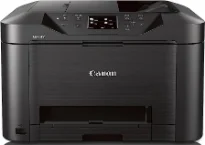
The Canon MAXIFY MB5020 printer model is an excellent product that produces an exceptional quality of output. For instance, black document printing has a rate of up to 23.0 images per minute (ipm). On the other hand, the ESAT mode’s color documents have a speed of 15.0 ipm under ideal conditions. The total number of nozzles is up to 4352, containing 1280 nozzles for the pigment black and 3072 nozzles for color documents.
Canon MAXIFY MB5020 driver Downloads for Microsoft Windows 32-bit – 64-bit and Macintosh Operating System.
Canon MAXIFY MB5020 Drivers for Windows
d4aeffcbb64e12a6484e3aab933d89d5ba9551af6781134f9015e12c4566f47c974d4d445024d853e466c0b3e714d4fb20d11ebc73c3cf5b49a7338ed848b36d8b1f35052d99fa6b5a428e0033983d55157c24b2d93e3a84205dd2f4f61da9828dd427942e8e31c574841b714286f9171dafe7b49dd781ec9b62ff0cc61cf1a415e26104a051d3f79061242bb8114e3d81f35bbe709d14bb07a6284eb01471d0Canon MAXIFY MB5020 Drivers for macOS
2671f3e8b99c437984ad0616f6c4b9f05bb7ae99cc0a33513583883302cd3b7011055a9b5ec6d69113585d98466e625c299ca7884e80f00020727f75fae1faba32a69059d3d8ce0a4dc45b2a7b288503803601bc9b38aea37c4c4fd3f76c87b71afeb535ed397255d08a42020061171252a1a3849ea8a8a96d7cfaa19ec0d7ac2ec53b62224a549c02580dbeff78ab3e26dd7e75eb0610a6f9cdc46c1fc704208946a6442a6cae0e5642f76103e12a7bbc9855fe176f36a73fd5777f10b8e9a9Canon MAXIFY MB5020 Drivers for Linux
07a441231fa9e7cc7c32e1ef126916ab54945382facf01e68a00785beacebf92e5bbd191ec8b36a204cc2c8c2468d1ee1050ea53b68b304c5c268eda8537f51c42a5c9e956c701f88537471eb1054f38a293e3df4396cdb337c0c3ecdcaa5ae4015e689b9106804871be22771742a2c5046ee40f89bf856058036c909055bdf15482b5bac88cc7a857a527573de16a95c7bfae5d3fac9efd7c5dbd957cc59c8c468103a27a4bfeb20f9233c45f97afa807091ca97255b94b129402a00a56cb20Canon MAXIFY MB5020 Specifications
Ink Cartridge Details
PGI-2200 Cyan Ink Cartridge
PGI-2200 Magenta Ink Cartridge
Yellow Inkjet Cartridge PGI-2200
PGI-2200 Black Ink Cartridge
Printing with the Canon MAXIFY MB5020 model is compatible with the PGI-2200 black, cyan, yellow, and magenta. On the other hand, it has an XL variety that can produce more document volume. The options include photo paper, letter, legal, and US envelopes regarding the standard paper sizes. On the other hand, other options include plain paper, high-resolution paper, photo paper plus glossy II, and photo paper glossy.
Some of this Canon MAXIFY MB5020 machine’s other classic features include a 3.0 inch liquid crystal display (LCD) touchscreen and a quick toolbox. Others include Apple AirPrint, automatic 2-sided printing, wireless printing, MAXIFY printing solutions, and an advanced auto sheet feeder. On the part of the output paper tray, it can take up to 250 sheets of printed paper or 20 sheets of photo paper. As a multifunction printer, this machine can carry out copying at a rate of 12 seconds.
Some essential copy features include 2-on-1, 4-on-1, auto exposure/intensity copy, collated copy (ADF), and a fit-to-page part. It can also work with frame erase copy (flatbed), preview, preset copy ratios, standard document, and zoom. By the way, the traditional scanning element is the contact image sensor (CIS). It also has an optical resolution of about 1200 x 1200 dpi for the flatbed and the ADF feature. On the other hand, its interpolated resolution is 19200 x 19200 dpi.
Technical Details
| Title | Canon MAXIFY MB5020 Drivers |
|---|---|
| Device Type | All-in-one printer |
| Driver Version | Varies by driver and operating system |
| Available Downloads | Drivers |
| License | Free |
| Manufacturer | Canon Inc. |