
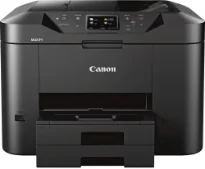
The Canon MAXIFY MB2720 printer model has a print rate of 24.0 images per minute (ipm) for continuous printing. However, the first page prints in just 6 seconds from the time of the command. On the flip side, the first printout page in color takes about 7 seconds. Subsequent pages in color have a rate of 15.5 ipm. In terms of the number of nozzles, the machine contains 4352 nozzles, which include 1280 nozzles for pigment black.
Canon MAXIFY MB2720 Drivers for Windows
9800c2bdf9fc87a2dfc39dffb6ef60745cfba45600afe942c1b2732efc7e38ff615a82f23f170258029389c6b5ee9c9c0e6c72e31c4e5a60df461475f8d49e43e1d3aff8afb93dfd3b198357b2246d5e2042459dfce392e0131f2edca7c7325f8dd427942e8e31c574841b714286f9171dafe7b49dd781ec9b62ff0cc61cf1a415e26104a051d3f79061242bb8114e3d81f35bbe709d14bb07a6284eb01471d0Canon MAXIFY MB2720 Drivers for macOS
bb0477043d2c667d1938d49246266fbffcb202b54b4ac6957d6475c4a6aa0f51dbdf662f8e82fa23d5b524e8f8ef9095f62b8e0aa0566ea155af6b41a09660a2a3d54a1aa29b04175a2b4dcdeb2829f34fe4eab38e03e391d3e4e648fb46de57d47eafd21282e7eb32448716061fc1b0760c089280b9f8d43e4b8b3aa294b90f03c043aa2df2241e49ab92441f7eab9268b9e2594f16a595114a039b0325a927f78b74dfff3f1f5e75fac3bbdd5073237a0f6b9e603c5c716b55cca5bf5a56b0Canon MAXIFY MB2720 Drivers for Linux
3b298716ad8b806fad72ed52714838921dea6f84253446a02d0e669afbc13804559acc98851ecf86000724ee268b473818b395c6b87524dc0d82ead6263a6ab598ba823924fb7835d6f2697a2561e0e92c44b64fc10b6f8086a7bbbe5ee998eabb8d108b2c3557f3dc258d47b560ce96608a006ec7b052a630e0a5f911da2413da7fddf03d95b487b55795812c9a27a00aa027a8f3bbcc76ead54ce07108976bcfb2af683f1d1ed0431948967bae872798d8b75da9eac1bfbf30aa8394220ab0Canon MAXIFY MB2720 driver Downloads for Microsoft Windows 32-bit – 64-bit and Macintosh Operating System.
Supported Ink Cartridges
Cyan Ink Cartridge PGI-1200 : Yields Upto 900 Pages
PGI-1200 Magenta Ink Cartridge : Yield approx 900 Pages
Ink Cartridge PGI-1200 Yellow : Upto 900 Pages
PGI-1200 Black Inkjet Cartridge : Approx 1200 Pages
The maximum print resolution for the Canon MAXIFY MB2720 model is 600 x 1200 dots per inch (dpi). Furthermore, the compatible cartridge types include PGI-1200 BK/C/M/Y models with varying print capacity levels. For instance, the black cartridge can print up to 12.4 ml by standard power while the cyan will print 4.5 ml. The machine’s black and white cartridge can print up to 1200 pages, while color cartridges will produce 900 pages.
The machine supports plain paper, high-resolution paper, matte photo paper, and photo paper glossy in paper compatibility. Concerning standard paper sizes, the Canon MAXIFY MB2720 model supports photo sizes, letter, legal, and US envelopes. Some of the other notable modern features of this printer include AirPrint, auto 2-sided printing, and an advanced auto sheet feeder. Others are Canon PRINT app4, quick toolbox, Google Cloud Print6, Microsoft Mobile Print, Mopria device printing.
The output paper tray in this machine can hold up to 250 sheets of plain papers of the letter and legal sizes. On the other hand, it can hold up to 20 sheets of photo paper of 4×6 inches size. In the lower cassette, the capacity is up to 250 sheets of plain paper. Besides, the noise level from this machine is about 56.0 dB (A). This machine can print, copy, scan, send, or receive fax messages as a multifunction printer.
Technical Details
| Title | Canon MAXIFY MB2720 Drivers |
|---|---|
| Device Type | All-in-one printer |
| Driver Version | Varies by driver and operating system |
| Available Downloads | Drivers |
| License | Free |
| Manufacturer | Canon Inc. |