
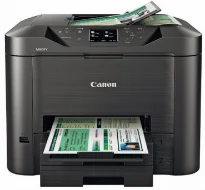
The Canon MAXIFY MB2360 is a great multipurpose printer that can print, copy, scan, and fax documents at top quality. The machine can print excellent quality output in four different colors of cyan, magenta, yellow, and black. Simultaneously, the minimum ink droplet size is about five picoliters for cyan, yellow, and magenta. But the ink volume is about 11 picoliters for black-colored documents. At the same time, this print technology will produce up to 600 x 1200 dots per inch (dpi).
Canon MAXIFY MB2360 Drivers for Windows
fa5f2fe135963ff61cac43464b4c1758283cbe5782f5506e9abbd710bae73dbfa8c54141ca818839fd46d6735519cb6d4084243184acd42682f4fdd0594e8e8b01cb57b43f5310adaa0e631b898aa19129dcc7853297e78eaab1720c2143aeca8dd427942e8e31c574841b714286f9171dafe7b49dd781ec9b62ff0cc61cf1a415e26104a051d3f79061242bb8114e3d81f35bbe709d14bb07a6284eb01471d0Canon MAXIFY MB2360 Drivers for macOS
e4abdc744ee85b9e9baed450fe0fd279778414dcb6156bb7710d16db2467f64d9ff2339c886e443243729c51fcddd0a083d0adc22a0db7345735d13aa551fb0f32a69059d3d8ce0a4dc45b2a7b288503803601bc9b38aea37c4c4fd3f76c87b71afeb535ed397255d08a42020061171252a1a3849ea8a8a96d7cfaa19ec0d7ac5d51f43561338c51d2e45f5be193a7d022934bc21eef6c67ab65c1bc122a7e728946a6442a6cae0e5642f76103e12a7bbc9855fe176f36a73fd5777f10b8e9a9Canon MAXIFY MB2360 Drivers for Linux
07a441231fa9e7cc7c32e1ef126916ab54945382facf01e68a00785beacebf92e5bbd191ec8b36a204cc2c8c2468d1ee1050ea53b68b304c5c268eda8537f51c42a5c9e956c701f88537471eb1054f38a293e3df4396cdb337c0c3ecdcaa5ae4015e689b9106804871be22771742a2c5046ee40f89bf856058036c909055bdf15482b5bac88cc7a857a527573de16a95c7bfae5d3fac9efd7c5dbd957cc59c8c468103a27a4bfeb20f9233c45f97afa807091ca97255b94b129402a00a56cb20MAXIFY MB2360 driver Downloads for Microsoft Windows 32-bit – 64-bit and Macintosh Operating System.
Ink Cartridge Details
Black PGI-1600 Ink Cartridge – Approx 400 pages
Magenta PGI-1600 Ink Cartridge – Yields Upto 300 pages
Ink Cartridge PGI-1600 Cyan – Upto 300 pages
Yellow PGI-1600 Ink Cartridge – Yields approx 300 pages
In fast document printing, the publication on A4 plain paper is about 15 images per minute (ipm) for color. On the other hand, when printing in black and white, the rate is about 23 ipm. This newly developed pigment ink can produce sharp text and a crisp image that is water- and highlight-marker-resistant. At the same time, high-quality printing can be as little as 7 seconds for the first printout page.
When copying, the first copy out time is approximately 7 seconds on average. In terms of the copy rate, the color documents copy at 10 seconds, and black and white are 21 ipm. Canon MAXIFY MB2360 Scanning produces an optical resolution of 1200 dpi while it supports a scan-to-folder function or memory function. Users can also take advantage of the multi-page scanning with a single-pass duplex component, which is more efficient. Scanning is approximately 18 ipm for monochrome and ten ipm for color documents.
Some of the other top-notch qualities of this machine include a free Xl cartridge use for higher productivity rates. Also, the tool supports mobile printing and scanning from any Apple or Android device. This feature is through the MAXIFY printing solutions app that users may have to install on such devices.
Technical Details
| Title | Canon MAXIFY MB2360 Drivers |
|---|---|
| Device Type | All-in-one printer |
| Driver Version | Varies by driver and operating system |
| Available Downloads | Drivers |
| License | Free |
| Manufacturer | Canon Inc. |