
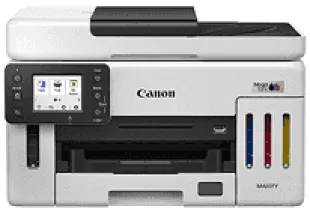
The Canon MAXIFY GX6170 Driver establishes communication between your computer and the printer during setup. Once installed, it helps the operating system recognize the printer and send print jobs over a compatible connection. Paper size, print quality and other selected settings are passed to the printer for processing. A compatible driver also helps prevent recognition errors and incorrect print settings during everyday document printing.
Canon MAXIFY GX6170 Drivers for Windows
30c8143f26d21f8fe9c80815e0ed64199c3983cd34ed224a6532b98d3bed71cfCanon MAXIFY GX6170 Drivers for Linux
f5f68553c9376f3512cdc05b8c29014031b3f201ea504d616079de98fdd7a6f2e8bb48fbc3885d17f667e290582992e1bfb5d5461068ee085400a5f2f2f95e72a75716fc9b2823ed61bda09bd720e188f0cb309c012e975a89815738ae71bb1b993393b072dfe2040083007485255a1f6174c6c3c093910b724eaca8febac676a5934b889ae17869b8bbd112ae687e00a992af7e423526a5d9c9872596663b98480930629dad2022f99d4b85274177efba9fe3f6214d904022b90aebbd927d60Canon MAXIFY GX6170 Specifications
The Canon MAXIFY GX6170 prints, scans and copies using refillable MegaTank ink. Its printhead contains 4,352 nozzles, supplied by separate pigment ink tanks for black and the three colours. Each tank takes GI-76 bottled ink, so one colour can be refilled without replacing the others. The MC-G01 maintenance cartridge is also user-replaceable. A 2.7-inch colour touchscreen controls copy settings, and the CIS scanner reads originals from the glass or automatic document feeder.
On A4 paper, single-sided printing reaches 24 images per minute in black and 15.5 in colour. Automatic duplex printing reduces those speeds to 13 and 10 images per minute. Two-sided jobs therefore take longer, although the paper is turned automatically. Maximum print resolution is 600 × 1200 dpi. Scanning reaches 1200 × 1200 dpi optical resolution, and copies can be resized between 25% and 400%, with a limit of 99 copies per job.
The front cassette holds 250 sheets of plain paper, including A4 and letter sizes. Smaller A5 sheets also fit, so everyday documents can stay in the main paper supply. A separate rear tray takes another 100 plain sheets and accepts legal paper or envelopes. Glossy and matte photo paper uses this rear feed, with room for 20 sheets at 4 × 6 inches. The automatic document feeder holds 50 A4 originals, dropping to 10 for legal-sized sheets.
A computer can connect through USB 2.0 or 10/100 Ethernet. Wireless printing uses a 2.4 GHz Wi-Fi network, although Wireless Direct can connect compatible devices without a router. Phones can print using AirPrint or Mopria. Scanned documents can also be saved directly to a USB flash drive without involving a computer. Canon recommends 300–2,500 printed pages per month, below the maximum duty cycle of 45,000 pages. Operating power consumption is approximately 20 W.
Technical Details
| Title | Canon MAXIFY GX6170 Drivers |
|---|---|
| Device Type | All-in-one printer |
| Driver Version | Varies by driver and operating system |
| Available Downloads | Drivers |
| License | Free |
| Manufacturer | Canon Inc. |