
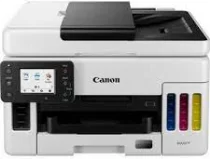
The effectiveness of the Canon MAXIFY GX6050’s driver significantly impacts how well the machine operates. For example, the printer has a print resolution of up to 600×1200 dots per inch (dpi) and supports one print head and a refillable ink tank printer. In addition, it supports Auto duplex print on A4 and Letter-plain paper while its mono print speed is approximately 24 ipm, and color print speed is 24 ipm. Similarly, Its First-Print-Out time for mono is 7 seconds (ready/simplex) and 8 seconds (ready/simplex) for color.
Canon MAXIFY GX6050 Drivers for Windows
bff195a8e4bece28130216a56b94a5885db6a00e96395de0aa085aabc7b83705798e36399844dd5e073619f71726bca37fe744344ac8e224237ef4fe72a41b8b8dd427942e8e31c574841b714286f9171dafe7b49dd781ec9b62ff0cc61cf1a415e26104a051d3f79061242bb8114e3d81f35bbe709d14bb07a6284eb01471d0Canon MAXIFY GX6050 Drivers for macOS
5f0e691f274411d793b3104fd2a25b5c6a3c1353506e05a2b4ce58feeef2c558Canon MAXIFY GX6050 Specifications
The print margin (min.) for the Top is 3mm, 5mm for the bottom, and 3.4mm for the left and right. Furthermore, it is compatible with plain paper, red Label Superior 80g/m, and Canon Oce Office Color Paper 80g/m. In addition, it supports photo paper pro luster, Matte Photo Paper, High-resolution paper, photo paper plus Glossy II, and Envelopes. Similarly, the Rear Tray maximum paper input includes 100 sheets of plain paper. On the other hand, Cassette can hold up to 250 sheets of plain paper, 50 sheets of ADF including A4, A5, LTR, and ten sheets of LGL.
Similarly, the machine supports different paper sizes and weights. For instance, Rear Tray or supported genuine Canon papers can hold a plain paper weight between 64gg/m to 105 g/m. Also, the same tray can hold canon paper with a maximum weight of up to 275g/m (Photo Paper Plus Glossy II). On the other hand, Cassette has a paperweight that ranges between 64g/m to 105g/m. Furthermore, the standard ink bottles are GI-56 BK, GI-56 C, GI-56 M, GI-56 Y, and MC-G01 (User Replaceable) as maintenance cartridges.
Furthermore, the supported scanner types are flatbed (AdF and Platen) and CIS color scanners. Also, the scan speed for color (simplex) is 16.9 ipm and 22.2 ipm for color (simplex), with a scan resolution of 1200×1200 dpi. Also, the maximum document size for platen is A4 and Letter(216x297mm), and for ADF is A4, Letter, and Legal(216×256). In addition, the copy speed of sFCOT (color) is 12 sec, sESAT (color) is 12.7 ipm, ESAT and Simplex ADF (color) is 12.2 ipm, and ESAT and Simplex ADF (black) is 22.3 ipm.
Technical Details
| Title | Canon MAXIFY GX6050 Drivers |
|---|---|
| Device Type | All-in-one printer |
| Driver Version | Varies by driver and operating system |
| Available Downloads | Drivers |
| License | Free |
| Manufacturer | Canon Inc. |