
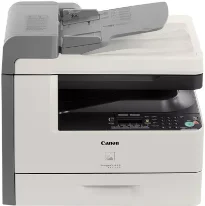
Using the Canon imageCLASS MF6540 model, the user can boast a monochrome printer that uses laser print technology. It can also print at a rate that is up to 24 pages per minute with letter-sized paper. On average, the print resolution is up to 600 x 600 dots per inch (dpi). Conversely, the maximum print resolution is up to 1200 x 600 dpi at the highest output quality. The machine is also compatible with the Canon cartridge 106 models, yielding up to 5000 pages.
Canon imageCLASS MF6540 driver Downloads for Microsoft Windows 32-bit – 64-bit and Macintosh Operating System.
Canon ImageCLASS MF6540 Drivers for Windows
3aed48d2849b0c07ab960b2c3cb1d318fab113d3d755f04914af01f77fbddd443e860fb353e94ae0cc039203b250182dd476189a1ec9e16f9f445ad32e8b086bdbce4bb1edae46d7b2715793d1d22414374a4af41b66e3aecb8356fd3a395680a4353cbe30dcb9bbe268a738a20a90395fa7e7d76ebd1303b3404dbd8c82c435a5fbf8a56e342ced6d8224ce4e4e41777681aabfcd2d2950e319d5a00860a2a9Canon ImageCLASS MF6540 Drivers for macOS
21b6eacda90c61ccadc50d0d76781576b8fd553b4a671e3d386f78fad17253b4af80abbfffc6c226407dfc5c2ea7fe751fb9c52c56dd4bf9a5cb587899b1368f5b8f8de010495b58464dd89bf0ec72e21a931f7476ebec8cf8c194361052d65779b3e920a4196ee4aaf6d17c5a095266ecf44e51626bd2902b01fa785dcd407504379ee4276dcb51d3d98f083a64cb6f006f980ebc7cfff7f3b862d6b83fb0ad86d5330d84af4dcc7458630c4999aae2495eebf5e1e3c6688e6e7c0453cb25a1120127e629c21787113c325d0a39041678f71d4a9f42e666ef90388f0c0584b569ef5f30da4c92762d2a5b614957892f1b542e16a07d53fec92f92bc3051fe32edd8dcff2593c749a946c421f8d3b7484ca2059b0e42799acf81f74ccc168efec5875b37125b8c8a32cad84148bab04417f7abf39551d213d21db0084be432cc5c70ce408e9af249acb1d961605a3c4e4741913910cc53c3a562af0ca8c76e6e0297641744ea447acd804af112d0693e6588ba52e03feaf0d3150446eb3e84f53d1cdceea84a542a2f3a87260766b5c9361b29b64316e7ff24d6a98a6826c68dcd403b42f9117b3534b580cc059e657ae4f18497b4b9c846bd39602446daae2822777e10690dcebdae80b6ec50e7bed2b28b71ca4cf9315646912ab2ad21c0669dd3f1b1c7dc175ab7cd4bb929f902c55966150a6a0273dbb36ccad0f146006a95a8a167b29fa549e7cef6686d42491921d3db11307ee86a2b894730cbc5e9a7c0f30b290384f17a632ab8d1bb4aaeb3589d0088456996795300daf6874e757fce4e588538376ea06d8cebe6fcce2f0feef6a769b6be9f24e7f1db99f24bb064245023025e79196fe45e820e0d6ae054991fda6551b4a53e028cd1844354065fCanon imageCLASS MF6540 Specifications
Supported Toner Cartridges
106 Toner Cartridge : Approx 5,000 pages
In a month, the Canon imageCLASS MF6540 printer can also produce a print capacity of up to 15,000 pages. However, the yield is according to the 5% coverage document range on the paper. In the main tray, the paperweight supports a range between 17 and 24 lbs. On the other hand, the multipurpose tray will support a range between 15 and 34 lbs. Simultaneously, the output tray can hold up to 100 sheets of printed paper in a face-down manner.
The average resolution is about 600 x 600 dpi with the maximum reach of 1200 x 600 dpi of the best quality under copying. The printer Canon imageCLASS MF6540 also has a speed of up to 24 copies per minute (CPM) when using the letter-sized paper. It can also zoom in or out of the original size within the 50 to 200% range in 1% gradual increments. Its first page of the copy function takes less than 8 seconds with 256 levels of halftones. It also uses a document feeder that can hold up to 50 sheets of plain paper.
The copy function also supports an internal shared memory of up to 128 MB of RAM. Simultaneously, the platen glass feature supports a paper size of up to 8.5 x 14 inches. And the ADF can take a range of 5.5 x 5 to 8.5 x 14 inches.
Technical Details
| Title | Canon ImageCLASS MF6540 Drivers |
|---|---|
| Device Type | All-in-one printer |
| Driver Version | Varies by driver and operating system |
| Available Downloads | Drivers |
| License | Free |
| Manufacturer | Canon Inc. |