
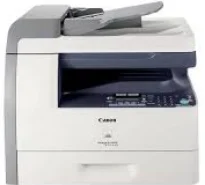
The Canon imageCLASS MF6530 model can produce a high quality of production through printing and copying features. Its main paper tray can hold up to 500 sheets of plain paper in addition to the 100 sheets of paper through the multipurpose tray. The necessary paper types include bond, plain, color, transparent films, labels, and envelopes. Black document printing also has a rate of 23 pages per minute (ppm) when using the letter-sized paper.
Canon imageCLASS MF6530 Drivers for Windows
1e55b30bf099421e06984ea0167319593481634772e2172cd07fda36b51afa5a08ea8176e55614996be77853c051e5f484ee254ef4ce5718018285bc32203a83dbce4bb1edae46d7b2715793d1d22414374a4af41b66e3aecb8356fd3a395680a4353cbe30dcb9bbe268a738a20a90395fa7e7d76ebd1303b3404dbd8c82c435a5fbf8a56e342ced6d8224ce4e4e41777681aabfcd2d2950e319d5a00860a2a9Canon imageCLASS MF6530 Drivers for macOS
21b6eacda90c61ccadc50d0d76781576b8fd553b4a671e3d386f78fad17253b45b8f8de010495b58464dd89bf0ec72e21a931f7476ebec8cf8c194361052d65704379ee4276dcb51d3d98f083a64cb6f006f980ebc7cfff7f3b862d6b83fb0ad120127e629c21787113c325d0a39041678f71d4a9f42e666ef90388f0c0584b5edd8dcff2593c749a946c421f8d3b7484ca2059b0e42799acf81f74ccc168efe5c70ce408e9af249acb1d961605a3c4e4741913910cc53c3a562af0ca8c76e6e3d1cdceea84a542a2f3a87260766b5c9361b29b64316e7ff24d6a98a6826c68d22777e10690dcebdae80b6ec50e7bed2b28b71ca4cf9315646912ab2ad21c06695a8a167b29fa549e7cef6686d42491921d3db11307ee86a2b894730cbc5e9a7c0f30b290384f17a632ab8d1bb4aaeb3589d0088456996795300daf6874e757fCanon imageCLASS MF6530 Drivers for Linux
d58796ee5518feee485119683cf7caa705668652803b8f0fb60177472ebe6d3bCanon imageCLASS MF6530 driver Downloads for Microsoft Windows 32-bit – 64-bit and Macintosh Operating System.
Toner Cartridge Details: 106 Toner Cartridge – Yield up to 5,000 pages
Besides, the average resolution when printing is about 600 x 600 dots per inch (dpi). However, the maximum print resolution reaches 1200 x 600 dpi for the highest quality. It is also compatible with the Canon cartridge model 106, producing up to 5000 pages before exhaustion. On the other hand, this device will create up to 15000 pages in a single month, according to the 5% coverage document. It also has 256 levels of halftones to maintain the gradient.
The resolution for the copying process is about 600 x 600 dpi. But for exceptional quality, the Canon machine may rank up to a rate of 1200 x 600 dpi. It also zooms in or out of the image within a range of 50 to 200% in 1% gradual increments. At the same time, it has up to 256 halftones and takes less than 8 seconds to produce the first copy. Besides, the copy feature supports an internally shared memory of up to 64 MB of RAM.
Furthermore, when scanning, the process takes a contact image sensor (CIS) to scan color documents. This feature can produce an optical resolution of 600 x 600 dpi. However, the interpolated resolution reaches 9600 x 9600 dpi. It can also support a maximum document size of 8.5 x 14 inches through both the platen glass and the ADF components.
Technical Details
| Title | Canon imageCLASS MF6530 Drivers |
|---|---|
| Device Type | All-in-one printer |
| Driver Version | Varies by driver and operating system |
| Available Downloads | Drivers |
| License | Free |
| Manufacturer | Canon Inc. |