
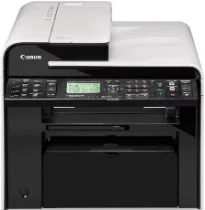
Users enjoy the unique features of the Canon imageCLASS MF4880dw printer model, which stands out from its counterparts. As a multifunction printer, the machine can print, copy, scan, and fax documents to produce exceptional quality output. In terms of the print speed, it depends on the print mode, which may be simplex or duplex. For instance, at the simplex or single-sided mode, the machine prints at the rate of 26 pages per minute (ppm).
Canon imageCLASS MF4880dw Drivers for Windows
037988586f4d86fc9034d2464219b730751e1153f21fa4a314a8ff25cdb21865037988586f4d86fc9034d2464219b730751e1153f21fa4a314a8ff25cdb218654d55a4a3e3f5a130bc7a9ccfc5f72f91edf71646e99efe25e959fc74157e973fCanon imageCLASS MF4880dw Drivers for macOS
b6ddb33c456e76b77c69654f2216908bce41d1c2f4c7b496f268dd5603748e09db4bd12b92b8a2e9c7a25ac0d3bae568b640c30b1739dbb30a4fa5b89a977d2caf80abbfffc6c226407dfc5c2ea7fe751fb9c52c56dd4bf9a5cb587899b1368f35223b2977d71ab373eafd6f14f28daa933cd2dcdc4b0d818da4a4432b14366879b3e920a4196ee4aaf6d17c5a095266ecf44e51626bd2902b01fa785dcd4075d5f10278e0dd91a898757299adb4a566e5f14e6ad073c885da268768b7b8172eff5d80d992a0f8b003104ffdc1bdf36bfe8bce0aa49cce77b27cdc9a95a5776c02735f008f6d8f5882c2824e3f2b83f7ccf7de77a1e3cca3f3007e0d40da0aef86d5330d84af4dcc7458630c4999aae2495eebf5e1e3c6688e6e7c0453cb25a16708a180dad9484c82047dc4624ec4b3dd3438231e6ac5cbcdba793755e1ddb45efcaeccd8b1f1103d2bb966199a47fc50f0116996d987bd51178d61474c215169ef5f30da4c92762d2a5b614957892f1b542e16a07d53fec92f92bc3051fe328a9fe8a3ad9ee02fb65e10e05eda1e6d8e6ba268fa987a6e164d5ba661bb1240917e7c7089148ed46d637656f66159b2042287e9084b2b921ae5b5f5c0eb0e48c5875b37125b8c8a32cad84148bab04417f7abf39551d213d21db0084be432ccddd1a155fe623f7f913e5bf860233ad73ccaaa5a5814b9b1e9353dd6501d88f7c5310bca335d137d5d319b3536e7bd3bca38355c1bd03236c03a8c33fc0acd3e0297641744ea447acd804af112d0693e6588ba52e03feaf0d3150446eb3e84f535dc19aa61aba625226444a79ce3488bb61f99b0c653d1abf054c9b471d5a1b3e65a67c44f07e8c6ecf20e167ae2d83d355023809358287d3a2badbce6507585cd403b42f9117b3534b580cc059e657ae4f18497b4b9c846bd39602446daae286321f7ffd7900bcf8e4b8ce99f0d3d7af91556b836e302306ae8a25a2e16df9de6a48ab862ab2fa01c7793bae9776d4de130b89fe50e189ff8c78d1e5fa6183d9dd3f1b1c7dc175ab7cd4bb929f902c55966150a6a0273dbb36ccad0f146006a360e961225a3a218f8f019abb06cafb6699a0ae2279c20467a32e972a2b98b6dce4e588538376ea06d8cebe6fcce2f0feef6a769b6be9f24e7f1db99f24bb064Canon imageCLASS MF4880dw Drivers for Linux
d58796ee5518feee485119683cf7caa705668652803b8f0fb60177472ebe6d3bCanon imageCLASS MF4880dw driver Downloads for Microsoft Windows 32-bit – 64-bit and Macintosh Operating System.
Toner Cartridge Details
128 Black Toner Cartridge
On the other hand, the duplex or double-sided mode has a rate of 16 ppm when using the letter-sized paper. The first print time with this device is about 5.8 seconds or less on the letter paper size. But the Canon printer language is the UFR II LT for the host-based device component. It has an average print resolution of up to 600 x 600 dots per inch (dpi). Conversely, the maximum print resolution is up to 1200 x 600 dpi.
The maximum print size for the optimum level is the regular size, including the duplex mode for printing on the two sides of a page. Other print modes include the use of a watermark, toner saver mode, and a page composer. It also has an internal shared memory of 128 MB of RAM. Under copying, the machine works in monochrome mode for black and white documents only. Furthermore, the copying rate is about 26 copies per minute (CPM) using a letter paper size.
This Canon imageCLASS MF4880dw model also produces a resolution of up to 600 x 600 dpi with compatibility with text, photo, and a combination of text/photo. It also has up to 256 halftones, while the warm-up time is approximately 13.5 seconds or less. Besides, the first copy out time is about 8.7 seconds or less with a recovery time of 2 seconds.
Technical Details
| Title | Canon imageCLASS MF4880dw Drivers |
|---|---|
| Device Type | All-in-one printer |
| Driver Version | Varies by driver and operating system |
| Available Downloads | Drivers |
| License | Free |
| Manufacturer | Canon Inc. |