
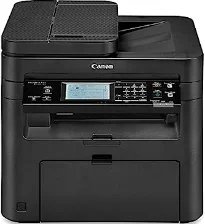
The Canon imageCLASS MF247dw printer device is a magnificent machine with laser print technology for best print performance. Printing is at the rate of up to 16 pages per minute (ppm) with a duplex print mode for letter-sized paper. Furthermore, in the simplex printing mode, the speed of production is up to 28 ppm for plain documents. At the same time, the first print time is about 6 seconds or even less. Besides, the printer device’s languages are the host-based UFR II LT, PCL 5e, and PCL 6.
Canon ImageCLASS MF247dw Drivers for Windows
82c7dd01ab984e76a694c4ac136664d92424f168e790b1a31d1ef9807989167d82c7dd01ab984e76a694c4ac136664d92424f168e790b1a31d1ef9807989167dab08c7e945c06ef915886b877d131455f84a7de9058c4e5177a031ec2ab5f4fd5cdf54609f86f5a6fe01e97458b36ed23c25c43e0b8e3acc7fd1e4573857c755baaa11e8addccaf105739b35741e6fd6213af1b3fa41acb22e122b1b2eb446974b19a11189d06ab953c8960157e1058cf40c65fbfe7b35b52222102db4d22d7304d2e8b6f97ecdbf6149ef728dccd1e27a7ad604327a8fa2972b7d5b6323ac3257f0f872dd5399978d93341ed0cb55757a432d7fb27ad51a2da192a6b74d580e636afb70d89aad0eddbd50fb1d8a784344bf23a95c5f078a00be3d231680db8e5ce34dce406f36dd4468fa4e86676ad211a0ebe5026fd2007168c92b420d76518489588dc560880fa58e7af3f4a0b67d115b55dfbf3ee02e20ba4e64f1a399d30f9c6406c46b234f582a575d1581efe532fa405c5390a18408e0a3cd074c9611b61dc3d97292c5b398738861d93bde601e4bef0b6df07b51f038ac409ed9a979ba516521903a6d3f420ee99db46038790be4c52c00f08e5f40dadb4103727ee33ae3a9bec19da4981fa9ffa55ea4f53d8846c5a1f2e740bf9ee2b1e5f1a7507a427b89bc8d04fad2cd44ff669aa188f9c594e14fa7a4377a6036d303db7140f3208591d3c62613ef02343cfcd7f8c7c6b45dddefcf416acfa279ee14f3a9b8981323957bc0dfb873feb7615df02432e15cf188e7fe6cdcac00f6ac0d4566f71d484d887fc334579b3dc3a8bc75da393a9e3965472a7d23778e61bd2de5b0bee2d71391ae208d0bd8009c2bd5bd3828d2bff8f394808ccf482e345c6adc373144de56033f3245fcb34e2e7b291a7aaa4c5c3810bb3294ae9cbdf27e8908830120e28f9a1833e68475afc71d7ef976dd021c8b8cdf16b52839422c8e9cfc5b6ae9a1d0b961fdd798587bb750d58bd88e2d4d862e5c59dbd8da495333aaf3a7cd41Canon ImageCLASS MF247dw Drivers for macOS
d5f10278e0dd91a898757299adb4a566e5f14e6ad073c885da268768b7b8172e0485a03ef39ecfdf93f0d306d06db70162ec51ee6101b8b216a6bf379343eb35503619d05f501b7a04c15b3f849f415878d501725df252139d81841280c628e8ff5d80d992a0f8b003104ffdc1bdf36bfe8bce0aa49cce77b27cdc9a95a5776ca2f4cd0e35483928ff487a3267ea5c930711de5d487220a3d3402f65c263e8e66708a180dad9484c82047dc4624ec4b3dd3438231e6ac5cbcdba793755e1ddb45efcaeccd8b1f1103d2bb966199a47fc50f0116996d987bd51178d61474c215169ef5f30da4c92762d2a5b614957892f1b542e16a07d53fec92f92bc3051fe328a9fe8a3ad9ee02fb65e10e05eda1e6d8e6ba268fa987a6e164d5ba661bb1240917e7c7089148ed46d637656f66159b2042287e9084b2b921ae5b5f5c0eb0e48c5875b37125b8c8a32cad84148bab04417f7abf39551d213d21db0084be432ccddd1a155fe623f7f913e5bf860233ad73ccaaa5a5814b9b1e9353dd6501d88f7c5310bca335d137d5d319b3536e7bd3bca38355c1bd03236c03a8c33fc0acd3e0297641744ea447acd804af112d0693e6588ba52e03feaf0d3150446eb3e84f535dc19aa61aba625226444a79ce3488bb61f99b0c653d1abf054c9b471d5a1b3e65a67c44f07e8c6ecf20e167ae2d83d355023809358287d3a2badbce6507585cd403b42f9117b3534b580cc059e657ae4f18497b4b9c846bd39602446daae286321f7ffd7900bcf8e4b8ce99f0d3d7af91556b836e302306ae8a25a2e16df9de6a48ab862ab2fa01c7793bae9776d4de130b89fe50e189ff8c78d1e5fa6183d9dd3f1b1c7dc175ab7cd4bb929f902c55966150a6a0273dbb36ccad0f146006aCanon ImageCLASS MF247dw Drivers for Linux
c0c2d391a4fd6e2f014a1e7e30a8cb20c7464112e1430532d3a5116f0cf648cbimageCLASS MF247dw driver Downloads for Microsoft Windows 32-bit – 64-bit and Macintosh Operating System.
Supported Toner Cartridges: 137 Toner Cartridge – Page yield up to 2,400 pages
The optimum print resolution for the output is up to 600 x 600 dots per inch (dpi). The maximum print size is up to 8.5 x 14 inches, which is the legal-sized paper. Some of the print modes of the device also include watermark, page composer, and toner saver. It also has an internal shared memory of 512 MB of RAM size. Under the copying specifications, the rate of work is also similar to that of the printing process. At the same time, the copy resolution is about 600 x 600 dpi.
The modem speed for this device is up to 33.6 kbps while using the Super G3 processor. The faxing resolution is up to 200 x 400 dpi with an ultra-fine mode. It also has a transmission time of approximately 3 seconds per page with a maximum memory capacity of 256 pages. It has up to four one-touch speed dials and can take up to 100 coded dials. At the same time, the Canon imageCLASS MF247dw model supports 103 destinations for group dialing.
Furthermore, there are 114 destinations for sequential broadcasting without duplex faxing. Other notable receive modes for faxing include FAX only, manual, answering, and the Fax/Tel auto switch.
Technical Details
| Title | Canon ImageCLASS MF247dw Drivers |
|---|---|
| Device Type | All-in-one printer |
| Driver Version | Varies by driver and operating system |
| Available Downloads | Drivers |
| License | Free |
| Manufacturer | Canon Inc. |