
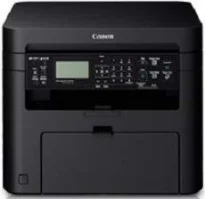
The Canon imageCLASS MF221d printer has a multifunction ability to print, copy, and scan documents with excellent output. Furthermore, it is a personal desktop printer and has an internal power supply between 220 and 240 volts at 50/60 Hz. However, the power requirements differ among countries, because they depend on the country of use. On the other hand, power consumption is a function of the printer’s printing status.
Canon imageCLASS MF221d Drivers for Windows
6730a7555fb894c7fcbdfebb40f96cfad54f878234182c4a8cf9c4111e0f3d836730a7555fb894c7fcbdfebb40f96cfad54f878234182c4a8cf9c4111e0f3d834d55a4a3e3f5a130bc7a9ccfc5f72f91edf71646e99efe25e959fc74157e973fCanon imageCLASS MF221d Drivers for macOS
96a508b8817dcf2f4b7b59ad21e195a640c540ff08a6411639aa7834d23e0743cb41803f7db3dba7467715a8b0eb892c101e0c4c2dd082f285dfd820d8f432a3b6ddb33c456e76b77c69654f2216908bce41d1c2f4c7b496f268dd5603748e0935223b2977d71ab373eafd6f14f28daa933cd2dcdc4b0d818da4a4432b143668d5f10278e0dd91a898757299adb4a566e5f14e6ad073c885da268768b7b8172eff5d80d992a0f8b003104ffdc1bdf36bfe8bce0aa49cce77b27cdc9a95a5776c02735f008f6d8f5882c2824e3f2b83f7ccf7de77a1e3cca3f3007e0d40da0aef6708a180dad9484c82047dc4624ec4b3dd3438231e6ac5cbcdba793755e1ddb45efcaeccd8b1f1103d2bb966199a47fc50f0116996d987bd51178d61474c21518a9fe8a3ad9ee02fb65e10e05eda1e6d8e6ba268fa987a6e164d5ba661bb1240917e7c7089148ed46d637656f66159b2042287e9084b2b921ae5b5f5c0eb0e48da6c9cbd85a75754061053b0cd0086f0297ea2f9d52a2bb0056fff1438bcff1209431107d2b98a5c1a3d4ae6141590e902abf12a5f16be1d69712e8cfe98455935dc19aa61aba625226444a79ce3488bb61f99b0c653d1abf054c9b471d5a1b3e65a67c44f07e8c6ecf20e167ae2d83d355023809358287d3a2badbce65075856321f7ffd7900bcf8e4b8ce99f0d3d7af91556b836e302306ae8a25a2e16df9de6a48ab862ab2fa01c7793bae9776d4de130b89fe50e189ff8c78d1e5fa6183d360e961225a3a218f8f019abb06cafb6699a0ae2279c20467a32e972a2b98b6dCanon imageCLASS MF221d Drivers for Linux
dfd33db96aacd96ba06c0f5bfa11fa9f5d368ef520100c6e5abf900539592e7eCanon imageCLASS MF221d Toner Catridge Details
Catridge 337 Toner : Upto yield 2,400 Pages
For instance, the maximum power usage is up to 1300 watts or even less. Similarly, the average consumption during the standby mode is 4.1 watts. Also, when the printer is in sleep mode, the power consumption is approximately 1.7 watts. It will also take about 13.5 seconds for the warm-up of the machine for it to start printing. The print specifications of the printer in physical measurements include a height of 312 mm. Its width is 390 mm while the length of the machine is 371 mm.
This Canon imageCLASS MF221d machine weighs about 11.4 kg, and it demands certain environmental factors to be in the right place. One such factor is a temperature within the range of 10 to 30°C. Also, the relative humidity is between 20 and 80%, with no condensation. On the other hand, this machine has interface options of 100Base-TX, 10Base-T, Hi-speed USB 2.0 port, and IEEE 802.11b/g/n component. The device also has a color scanner with a maximum compatible size of 216 mm x 297 mm.
The optical resolution of the printer’s scanning process is up to 600 x 600 dots per inch (dpi). In the same way, the software interpolation resolution is 9600 x 9600 dpi. Also, the driver options include the TWAIN, WIA 1.0 (Windows XP), WIA 2.0 (Windows Vista/7/8/8.1) and ICA (Mac OS X). Furthermore, the output tray of the device can hold approximately 100 sheets of printed paper at 68 gsm.
Technical Details
| Title | Canon imageCLASS MF221d Drivers |
|---|---|
| Device Type | All-in-one printer |
| Driver Version | Varies by driver and operating system |
| Available Downloads | Drivers |
| License | Free |
| Manufacturer | Canon Inc. |