
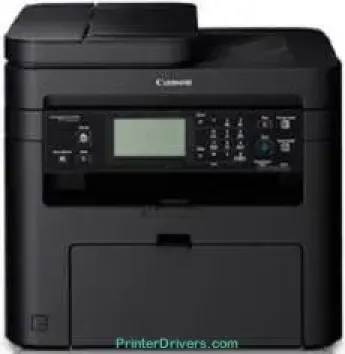
The new Canon imageCLASS MF226dn model is a premium device that can print, copy, scan, send, and receive fax documents. Some of the characteristic features of the machine include duplex printing through the network connection. The applicable toner in the device is a CART 337 toner that can produce up to 2,400 pages. But the starter cartridge can only print about 1700 sheets of paper. Similarly, there is an on-site warranty that spans 1 or 2 years.
Canon imageCLASS MF226dn Drivers for Windows
6730a7555fb894c7fcbdfebb40f96cfad54f878234182c4a8cf9c4111e0f3d836730a7555fb894c7fcbdfebb40f96cfad54f878234182c4a8cf9c4111e0f3d834d55a4a3e3f5a130bc7a9ccfc5f72f91edf71646e99efe25e959fc74157e973fCanon imageCLASS MF226dn Drivers for macOS
d5f10278e0dd91a898757299adb4a566e5f14e6ad073c885da268768b7b8172e0485a03ef39ecfdf93f0d306d06db70162ec51ee6101b8b216a6bf379343eb357ed8ff47527ce1ab2938de1043f3c7f5dd4d17fbde11b07b712190b4d4e7a30cff5d80d992a0f8b003104ffdc1bdf36bfe8bce0aa49cce77b27cdc9a95a5776ca2f4cd0e35483928ff487a3267ea5c930711de5d487220a3d3402f65c263e8e66708a180dad9484c82047dc4624ec4b3dd3438231e6ac5cbcdba793755e1ddb45efcaeccd8b1f1103d2bb966199a47fc50f0116996d987bd51178d61474c2151c98999b876d4bc8928e9adbfd33748039773dbb01850e711679363ae3e93785b8a9fe8a3ad9ee02fb65e10e05eda1e6d8e6ba268fa987a6e164d5ba661bb1240917e7c7089148ed46d637656f66159b2042287e9084b2b921ae5b5f5c0eb0e4837c7892368c2313a0619c97b4f71f32be34757bfcc84538a957d6f23e43e81f0da6c9cbd85a75754061053b0cd0086f0297ea2f9d52a2bb0056fff1438bcff1209431107d2b98a5c1a3d4ae6141590e902abf12a5f16be1d69712e8cfe9845590297641744ea447acd804af112d0693e6588ba52e03feaf0d3150446eb3e84f535dc19aa61aba625226444a79ce3488bb61f99b0c653d1abf054c9b471d5a1b3e65a67c44f07e8c6ecf20e167ae2d83d355023809358287d3a2badbce6507585319819327b889a34a931905184cbeb1e9c986e5d635fa77c88f5de1e424c30886321f7ffd7900bcf8e4b8ce99f0d3d7af91556b836e302306ae8a25a2e16df9de6a48ab862ab2fa01c7793bae9776d4de130b89fe50e189ff8c78d1e5fa6183d9dd3f1b1c7dc175ab7cd4bb929f902c55966150a6a0273dbb36ccad0f146006a360e961225a3a218f8f019abb06cafb6699a0ae2279c20467a32e972a2b98b6dce4e588538376ea06d8cebe6fcce2f0feef6a769b6be9f24e7f1db99f24bb06402735f008f6d8f5882c2824e3f2b83f7ccf7de77a1e3cca3f3007e0d40da0aefCanon imageCLASS MF226dn Drivers for Linux
3dfe6667e86809da6fd5a9775f7097c3e3e124934759090bd945b03fa6a13c28Canon imageCLASS MF226dn Toner Catridge Details
Cartridge 137 Toner : Yield up to 2,400 pages based on Standard ISO/IEC
Specifications
Canon imageCLASS MF226dn model printer has a rate of 27 pages per minute (ppm) when printing on A4 paper. It also has a resolution of 600 x 600 dots per inch (dpi) in the standard mode. But this print quality can improve with an image refinement technology to reach up to 1200 x 1200 dpi. It takes a warm-up time of 13.5 seconds or even less from the Power ON mode. The first printout time is approximately 6 seconds, but the recovery time is 2 seconds from recovery mode.
Related Printer :Canon imageCLASS MF448dw Driver
The compatible print language is UFR II LT, while there is also an auto-duplex print mode for standard printing. The machine also supports standard paper sizes such as A4, letter, legal, officio, B-officio, M-officio, Indian legal, and foolscap. But the weight support range is between 60 and 105 gsm. Each paper also supports a printable margin of 5 mm on all sides of the article except for envelope sizes. For envelope sizes, the printable margin is 10 mm on all sides.
Some other exciting print features include the poster, watermark, page composer, and the toner saver. Scanning has an optical resolution of up to 600 x 600 dpi, while the enhanced driver resolution is 9600 x 9600 dpi. The color depth is 24-bit, while this model also supports duplex scanning for both sides of the paper.
Technical Details
| Title | Canon imageCLASS MF226dn Drivers |
|---|---|
| Device Type | All-in-one printer |
| Driver Version | Varies by driver and operating system |
| Available Downloads | Drivers |
| License | Free |
| Manufacturer | Canon Inc. |