
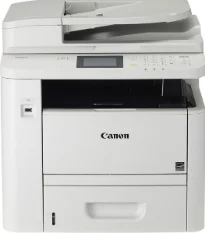
The Canon i-SENSYS MF416dw model is a monochrome printer with lots of qualities that return a good investment value. Its available functions include printing, copying, scanning, and faxing. Concerning the speed, this machine works in a single-sided mode at the rate of 33 pages per minute (ppm) for A4 paper. However, double-sided printing on the same A4 is up to 16.8 images per minute (ipm).
Canon i-SENSYS MF416dw Drivers for Windows
4d6258a423ffa512f6dcb55244a25cbfe166cf355205f67502edf0e7bbd052394d6258a423ffa512f6dcb55244a25cbfe166cf355205f67502edf0e7bbd0523970e88963db09686cc95a6dc17e00113c162fdba6466529fbe80ce505cf71bb8b60acc9b516cddc1d2625b8d211e60d8167965f15a755f665c4732a2d82024d0ec60ae7abde74362ee1fc65c30bd9d6dbd210613ae7713e332cb28ca73d2602ce04d2e8b6f97ecdbf6149ef728dccd1e27a7ad604327a8fa2972b7d5b6323ac32979feeac98383f6de997313a1d3a6fd34cf1d9b95b65894a99852f93693b8dfa4a9a1df9c5994c09b491bea55250c3a9803402f7cff710cb623807b64594e7289392ac4854b6611280a41af3b0273a86f621eaf21a1b98f60bb72df9a27a75080f9c6406c46b234f582a575d1581efe532fa405c5390a18408e0a3cd074c9611ca24566a8863d09cb0a71bc936a2b859655bc9f17e472761da0d0a8459ab785bd978ee6c4172ea568d6aae8fd3e874fa2096bf93ff90717e4fe34550fd75e385484d887fc334579b3dc3a8bc75da393a9e3965472a7d23778e61bd2de5b0bee29e0a235803be9f47a5d243d9335d0f9156f4db43c0d73229137365945e3a335e7a200f2859ea45211c0c938d625b3d4b93d88451d47d4b902f0cf9f5868ea37a4d55a4a3e3f5a130bc7a9ccfc5f72f91edf71646e99efe25e959fc74157e973fCanon i-SENSYS MF416dw Drivers for macOS
b6ddb33c456e76b77c69654f2216908bce41d1c2f4c7b496f268dd5603748e09120d84051404d68ff23facc20ca6068b52d890770b6a9f100e82adfa5277a5aadb4bd12b92b8a2e9c7a25ac0d3bae568b640c30b1739dbb30a4fa5b89a977d2caf80abbfffc6c226407dfc5c2ea7fe751fb9c52c56dd4bf9a5cb587899b1368fd5f10278e0dd91a898757299adb4a566e5f14e6ad073c885da268768b7b8172edc0b747649fd9f72c6908765afdccac3720f84838bd6491360b431c69ee2fd6a35223b2977d71ab373eafd6f14f28daa933cd2dcdc4b0d818da4a4432b14366879b3e920a4196ee4aaf6d17c5a095266ecf44e51626bd2902b01fa785dcd4075ff5d80d992a0f8b003104ffdc1bdf36bfe8bce0aa49cce77b27cdc9a95a5776c86d5330d84af4dcc7458630c4999aae2495eebf5e1e3c6688e6e7c0453cb25a16708a180dad9484c82047dc4624ec4b3dd3438231e6ac5cbcdba793755e1ddb46790fad87cfd6df48f74ed732c2c222f5baa62e7a17958b029f2efd102ce36315efcaeccd8b1f1103d2bb966199a47fc50f0116996d987bd51178d61474c2151c98999b876d4bc8928e9adbfd33748039773dbb01850e711679363ae3e93785b8a9fe8a3ad9ee02fb65e10e05eda1e6d8e6ba268fa987a6e164d5ba661bb1240e7931af2339fea2198ae845c6357e921538761f3610de796cbbf426d81eebfd3917e7c7089148ed46d637656f66159b2042287e9084b2b921ae5b5f5c0eb0e4837c7892368c2313a0619c97b4f71f32be34757bfcc84538a957d6f23e43e81f0da6c9cbd85a75754061053b0cd0086f0297ea2f9d52a2bb0056fff1438bcff1282479e45d013253d1629fa59133d3c05fa5002f39303f4f772912d334dc6f39509431107d2b98a5c1a3d4ae6141590e902abf12a5f16be1d69712e8cfe9845590297641744ea447acd804af112d0693e6588ba52e03feaf0d3150446eb3e84f535dc19aa61aba625226444a79ce3488bb61f99b0c653d1abf054c9b471d5a1b3e36a86682555814ab749d6fcc4df5ae336b34c5effd7760bbbc8330cb7e07d40e65a67c44f07e8c6ecf20e167ae2d83d355023809358287d3a2badbce6507585319819327b889a34a931905184cbeb1e9c986e5d635fa77c88f5de1e424c30886321f7ffd7900bcf8e4b8ce99f0d3d7af91556b836e302306ae8a25a2e16df9d272765a3f84315bd212c67b3fff1852f23a365abc5b0e061b1b5e25ed0dd811ae6a48ab862ab2fa01c7793bae9776d4de130b89fe50e189ff8c78d1e5fa6183d9dd3f1b1c7dc175ab7cd4bb929f902c55966150a6a0273dbb36ccad0f146006aCanon i-SENSYS MF416dw Drivers for Linux
29e2380e21bda8c31f8c08435a2ba49cba61c13abfa47ba78081a9b0e55df333Canon i-SENSYS MF416dw driver Downloads for Microsoft Windows 32-bit – 64-bit and Macintosh Operating System.
Toner Cartridge Details: Black Toner Cartridge 719: Approx. 2100 Pages
Users can also note that the Canon i-SENSYS MF416dw uses the monochrome laser-beam print technology. In other words, it can print documents with an output resolution of 600 x 600 dots per inch (dpi) on average. On the other hand, the maximum print output resolution is up to 1200 x 1200 dpi. Also, the duplex printing can be automatic, by which it prints on both sides of the page. At the same time, it works with a toner saver mode that can maintain print quality.
It can actively scan color documents with an optical resolution of 600 x 600 dots per inch (dpi) as a multifunction printer. On the other hand, it also produces an enhanced resolution of up to 9600 x 9600 dpi. However, the scanning speed depends on the current scanning mode of the Canon machine. For instance, single-sided monochrome scanning of monochrome documents is about 33 ipm with a 300 x 600 dpi resolution.
Furthermore, single-sided color scanning has a speed of 11 ipm and a 300 x 300 dpi resolution. Besides, double-sided monochrome scanning is about 13 ipm with a 300 x 600 dpi resolution. On the other hand, if the double-sided printing is on color documents, then the rate is about seven ipm with a 300 x 300 dpi resolution. Besides, the color scanning depth is about 24 bit/24 bit for both input and output dimensions.
Technical Details
| Title | Canon i-SENSYS MF416dw Drivers |
|---|---|
| Device Type | All-in-one printer |
| Driver Version | Varies by driver and operating system |
| Available Downloads | Drivers |
| License | Free |
| Manufacturer | Canon Inc. |