
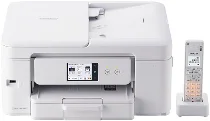
Brother MFC-J943DN Driver gives the computer the software link needed for this all-in-one printer’s printing, scanning, copying, and faxing functions. Once installed, the system can detect the unit through USB or a wireless connection. Scan and copy commands travel through that same device connection, while fax operation depends on the fax driver components being installed correctly. Print jobs, scanned originals, copied pages, and fax tasks can then pass between the computer and the machine without using separate hardware.
Brother MFC-J943DN Drivers for Windows
bcf42287a6feb5180dea3d2ff80c905437573aaa66e9459820326ba2c09cd6d788c2859bb73443ee7219e69b64aa9fc96a0851565f03766eb7084941c89941201e50ab82451b7d1e1807b357cfdbd745bdd64935d9062b6036222c8602ad7cbc1e50ab82451b7d1e1807b357cfdbd745bdd64935d9062b6036222c8602ad7cbc0edce9170c3f46f065e52aa6335c093befa453212698a94c7d59fcfc5197fa7e0917273bb5bc10ee4775f36bd98bd05152835bf5370614cf5a803ffa9260b0adBrother MFC-J943DN Drivers for macOS
3d31317f050892dd89b4a54b9ebb9c985b6762a3c55a7535e56bdf5ea5fe2f98Brother MFC-J943DN Drivers for Linux
3719b59873fe0585eafb44e5666b9930e83d1f0f110ec267173c4056ff85fe3f811a81c14aec66fab3a7ed24ce59ec10c3d6690045013d381823ca95e3d1c7199c3a200db3dc7b2b3332dff8c5226b4f3ee560d20b2e1f4918b1faf7124517b2197f63a52e89b8744f5a3c2d843abb3b76d003d5d4830bdfe675c44841a6c72bcda25534ea8e3018e7d46b970cb08b36084355adedc933aba0c8c7d03e903db901dc859f1978e645147ced5ec4b5448cc3e26b1c6d2f1104834f5891c0e17469d724746540a51f8286f2a318b47657227f7131d384a1a4f0475dacb7e3580f3ee74ef3a5529ebf3b26d6139ce15d75374a4538ba2efd48c28b209b0d705e5ec72ba3bffcf199fee6387cb79d6923214648db0f2df1c5a13f8f8f0a6fe0995c401404f2622e60470b4de25d0cdb4adc0f130ace6b380cc0d4b3d7714ad761c1aee28a8765f6637456d81ad1a56226e6857be2f1581fdcd9e4a5a4fbc4c42dd3450a4412b306b9ce2eb7e3ef4734a7b648f9561f525922b02541e98b545929dc2b82aa17ba2e331de1fcb34f0a839d27b9b193ac680d9742250a89e588a6bd56206c4e17c6dbcf263d9d08fb460ccd5b9f1a23fce79b30d0a41d96a224839322b2Brother MFC-J943DN Specifications
Brother MFC-J943DN is an A4 colour inkjet all-in-one with print, copy, scan, fax, telephone, and cordless handset functions. The body carries a 2.7-inch touch-panel LCD and 256 MB of memory. Printing uses four separate LC511 ink cartridges, with pigment black and dye-based cyan, magenta, and yellow inks. Its closed body measures 390 x 343 x 182.5 mm and weighs about 7.6 kg without the cordless handset.
Print resolution reaches up to 1200 x 6000 dpi, with a 2 pl minimum ink droplet. A4 plain-paper speed is about 15 ipm in monochrome and 14.5 ipm in colour. In ink-save mode, draft speed rises to about 27 ppm and 23 ppm. First print time is about 6.2 seconds for mono output and 6.5 seconds for colour. Borderless printing uses 0 mm margins when the borderless setting applies.
Scanning works through the flatbed and 20-sheet automatic document feeder. Optical scan resolution reaches 1200 x 2400 dpi, while ADF scanning is limited to 1200 x 600 dpi and software interpolation reaches 19200 x 19200 dpi. Copying reaches 1200 x 2400 dpi, produces up to 99 copies, allows 25 to 400 percent resizing, and can create two-sided copies from one-sided originals on plain paper.
Paper input comes from a 150-sheet front tray, while the output tray holds up to 50 sheets of plain paper. A one-sheet manual feed accepts the A4-to-photo range, including postcards and index cards. Envelope handling covers Com-10, DL, and Japanese envelope sizes. Automatic duplex printing works on plain A4, A5, and B5 media. Connections include Hi-Speed USB 2.0, wireless LAN on 2.4 GHz and 5 GHz bands, Wi-Fi Direct, AirPrint, and Mopria.
Technical Details
| Title | Brother MFC-J943DN Drivers |
|---|---|
| Device Type | All-in-one printer |
| Driver Version | Varies by driver and operating system |
| Available Downloads | Drivers |
| License | Free |
| Manufacturer | Brother Industries, Ltd. |