
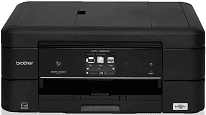
The Brother MFC-J885DW printing device runs on the inkjet print technology with the piezo with 210 nozzle type. The printhead above applies to print both in colors in black and white but in three types. Brother MFC-J885DW printer has an internal memory capacity of 128 MB of RAM, which works with the inbuilt processor. The control panel comprises a liquid crystal display (LCD) touchscreen that measures up to 2.7 inches diagonally.
Brother MFC-J885DW Drivers for Windows
aa27b6ff7fe8dd77cad826640e7facc09759cccfa16a2aca45c0cc4ce11f96cf3bb9c77c7ecc71520ab4a0c995743b58be81d5f58702a1e275b6be6f0b52e4dfBrother MFC-J885DW Drivers for macOS
ab64878616f2d0ddbf65ea85e386b8e122bd5549079ad82012a8d47a21079c992b229ea56fe0606c51a04cf94f9d615a96308c25f6e7574d3490237b47e68261997b441c2d6b6eea9085ab9daf81fa3ce27916856cacc439dab086d1f98550fb6a9ef2865964ff4918dd1441876a80485fb8c329df36aa8d6680deff2eecd53ebbe2a9d148f43169817ed419d5abddab350e8c1f383b3b66510ee88f959ce3c81db35bf9cb989eadcae7a1395cc67a74e7513546c6636c220be141832f2d66dc21b4c7490f1f5e8124a2f6298286e7488571da3235a47d6ec1774d3867cd159148399d992452e6d99b8936172b6e3e96342df366456a76b4acbca87162bb9058507e32804af4b8f17f00cff1b31a17e5d99950a1871b22c6fb45d94520699b26b1626d412ec00f75a1abe18dcda6c62dc704c919b324c25c05645a357c6e4163c59503f190f34b0db53cd32365f7fa031bb4104bfafe041a12e9c98c11b0fd825a7267150b83ee885c1eaea15b7033b2cce24fd9c0ff9335ad5e5e43d2a9371259553d65e3e1fd0efacf7816fbbefce981bc6f2b27ffc20c6b452dba4c4a8d7ca47f2e6b9b5d9f4dc7bf154292f2e691176be4724779a06d00497673134f1a501cfcc134da6adc9c0628b41572bb9c2231ce15a162d5f167209b1ff62dfd79baBrother MFC-J885DW Drivers for Linux
1bfa6669beb281a10e3ff5545152277eedaf0fe17054c166f84ae9a7eee99cf12b1403494597b319fba1c96c63bf254eb54fa2161c575675b69043bcf04a3fac16dc18a2d9b9ebd4be6feb9e238a3ae0c907522ded493a565431de4903e83dc3b4f2c242c053f88e9678f27f697da2606f99a91528512f3c90594eacc9c2c5a1027b73648722ac8c8eb1a9c419d284a6562cc763feac9740a2b75a683b0929727d7dcbe8349ae4d4ab816e4551017f2f1fd9fd6bf3f4f3c570fbd9576248dd9f4225e91dd7f7d0ba2a202f616b15b669be7800c271a7d25efed94191f71fc4508bd395b8a25a385eb4a5e2770d4b10b17735203006b7a90a6879a0ef69e5fe4df71dadda535bb90dbfaf88fd603897f96e8b09a2f3ae9bd4e2daafb925e896e24082d824222ec7a7646309260fd661387ca1aa5dc1ffe851db7bbefe5271b755Brother MFC-J885DW Specifications
The power source operates within a voltage range between 100 and 120 volts with a frequency of 50/60 Hz. The power consumption is a factor of the present ongoing process of the multifunction printer; for instance, the printing and copying processes run with a power consumption of 20 watts. On the other hand, the active mode uses 3.5 watts; the sleep mode uses 1.3 watts and the power off mode is approximately 0.2 watts.
The Brother MFC-J885DW printer height is about 8.9 inches; the width is about 6.8 inches while the depth is approximately 15.7 inches. The weight of this device is about 18.1 lbs, which is about 8.2 Kg. This printer has an automatic document feeder (ADF) which has a capacity of holding up to 20 pages. The appropriate temperature range for optimum use of the printer is between 10 and 35°C. However, to get the best print quality, the temperature range should be between 20 and 33°C.
The compatible paper types may include plain paper, inkjet paper (coated), glossy paper and recycled paper. In addition to the temperature range, the humidity range should remain between 20 and 80% for both operations and best print quality. The document size for the ADF width is between 5.8 and 8.5 inches and the length is between 5.8 and 14 inches. The scanner glass width is 8.5 inches at maximum and the length is 11.7 inches at maximum.
Technical Details
| Title | Brother MFC-J885DW Drivers |
|---|---|
| Device Type | All-in-one printer |
| Driver Version | Varies by driver and operating system |
| Available Downloads | Drivers |
| License | Free |
| Manufacturer | Brother Industries, Ltd. |