
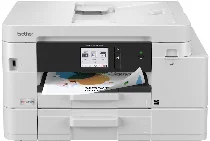
Brother MFC-J4555DW Driver lets a computer send print and scan commands correctly to this colour inkjet all-in-one printer. After installation, the system can recognise the machine for printing, scanning, copying, and faxing. A local setup may use a wired connection, while wireless setup sends jobs through the network. The driver also carries document and image settings from the computer to the printer before output begins.
Brother MFC-J4555DW Drivers for Windows
80ba5593ec925267fc83ce4cdbf9fc07793a808cce960aa7cadeb72dc6dd00e8940f5e4e81dbb3e9162f90a6236fb3b440916812a6205bef0d41fea604df23c1940f5e4e81dbb3e9162f90a6236fb3b440916812a6205bef0d41fea604df23c10edce9170c3f46f065e52aa6335c093befa453212698a94c7d59fcfc5197fa7e0917273bb5bc10ee4775f36bd98bd05152835bf5370614cf5a803ffa9260b0adBrother MFC-J4555DW Drivers for macOS
3e25c08d380ad841fda125a40aa6ed20db86bd1a4d2188d1eeed831bfce5b167Brother MFC-J4555DW Drivers for Linux
081d09dbfc991775532a0995218f7157338eea1beadc4b94ac110c2406af648ae9ac79d78e49a7dc76faef15064b24c98bd8e97cc4f6e4fc952333d13889c0e79c3a200db3dc7b2b3332dff8c5226b4f3ee560d20b2e1f4918b1faf7124517b2197f63a52e89b8744f5a3c2d843abb3b76d003d5d4830bdfe675c44841a6c72bcda25534ea8e3018e7d46b970cb08b36084355adedc933aba0c8c7d03e903db901dc859f1978e645147ced5ec4b5448cc3e26b1c6d2f1104834f5891c0e17469d724746540a51f8286f2a318b47657227f7131d384a1a4f0475dacb7e3580f3ee74ef3a5529ebf3b26d6139ce15d75374a4538ba2efd48c28b209b0d705e5ec71404f2622e60470b4de25d0cdb4adc0f130ace6b380cc0d4b3d7714ad761c1aee28a8765f6637456d81ad1a56226e6857be2f1581fdcd9e4a5a4fbc4c42dd3450a4412b306b9ce2eb7e3ef4734a7b648f9561f525922b02541e98b545929dc2b82aa17ba2e331de1fcb34f0a839d27b9b193ac680d9742250a89e588a6bd56206c4e17c6dbcf263d9d08fb460ccd5b9f1a23fce79b30d0a41d96a224839322b2Brother MFC-J4555DW Specifications
The Brother MFC-J4555DW is a wireless INKvestment colour inkjet all-in-one with print, scan, copy, and fax functions. Its four-cartridge system uses Brother LC506 black, cyan, magenta, and yellow supplies. A 2.7-inch colour touchscreen sits above the main controls, while 256 MB memory and a 576 MHz processor support the internal hardware. Scanning comes from the flatbed or the 20-page single-sided ADF assembly, depending on the original.
Printing reaches 1200 x 4800 dpi, with plain-paper speed up to 20 ppm in black and 19 ppm in colour. First page timing is about 5.8 seconds in black and 5.9 seconds in colour. Borderless output reaches Letter size. From the glass, scans reach 1200 x 2400 dpi; from the ADF, they reach 1200 x 600 dpi. Copying reaches 1200 x 1200 dpi, and faxing runs through a 14.4 Kbps modem.
Paper input is divided between a 150-sheet upper tray, a 250-sheet lower tray, and a one-sheet manual feed slot. Printed sheets collect in a 100-sheet output area, while the ADF accepts up to 20 pages and legal-size originals. The trays and manual feed cover paper sizes up to Legal; envelopes, glossy paper, inkjet paper, recycled paper, and index cards belong to the appropriate feed paths.
Ethernet, dual-band wireless 802.11 b/g/n and 802.11 a/n, Wi-Fi Direct, and Hi-Speed USB 2.0 provide the main connections. A front USB host port prints from and scans to a USB memory stick, while AirPrint, Mopria, and Brother Mobile Connect handle mobile printing. Automatic duplexing applies to printing only; closed dimensions are 17.1 x 14.0 x 9.8 inches, and the listed weight is 22.9 lb.
Technical Details
| Title | Brother MFC-J4555DW Drivers |
|---|---|
| Device Type | All-in-one printer |
| Driver Version | Varies by driver and operating system |
| Available Downloads | Drivers |
| License | Free |
| Manufacturer | Brother Industries, Ltd. |