
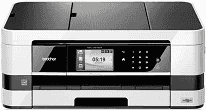
Both personal and commercial users will find this Brother model of printer very usable and compatible with work. The assurance is more so with a moderate body with a combination of black and white colors. The printer type has a classification as the piezoelectric inkjet print technology with the classic printheads. There are two categories for the piezo with 420 nozzles printheads, one for the monochrome and three for color printing.
Brother MFC-J4510DW Drivers for Windows
421cb18b50dc9a8b8439eb4e7fff95976f96238befd092a1ec33c83b4c7f4f62981f03b7772218f94dcc84d399d0c1c7713a78649ee559d869d4220989b8ede8Brother MFC-J4510DW Drivers for macOS
39e686c6a5eb686f6a668d882c68cf2973a44dc8d43887c84c39456f627874796a9ef2865964ff4918dd1441876a80485fb8c329df36aa8d6680deff2eecd53e85dd93c9899987396de8e314162ac32e06a0f7aefab2c6fe09bd36e684c00dde949467d5fd874da4f4bcf9028483495f8319aad70483dbb26c2c4db964fbc8a7c589827024c6300bc6fc4d51b1356902ddf4c49eac227106cb9fdf2f72d81ab25a7267150b83ee885c1eaea15b7033b2cce24fd9c0ff9335ad5e5e43d2a9371259553d65e3e1fd0efacf7816fbbefce981bc6f2b27ffc20c6b452dba4c4a8d7ca4a18b1135fd43208a9c5b956aa2103faf0303ea05325f43e24c02ffd608a612a47f2e6b9b5d9f4dc7bf154292f2e691176be4724779a06d00497673134f1a50a24d10d3d517bf128071bc4323daa294327001bab9f3f54c1551f455d4f4586c47e26a481968bd3ae74b6d77b69c018982a7e0451375ed6990cb18cfd6c92b59d49bd628e0994b6eea2606bb53644da76ad567fd08151703cbf9d409567e44fe43101113076fac90320ee2eebae961b0147f6cb289b74eb4832e04c2f33d9004868ee1de715a54d657a791d0077a3621bbc02efe2d1d5e69a9b3472a42f1aad0913be14669256848ec6b056544f88dfcce896f451fbe32f374a56eea1d4d34cc531b146524d0ad45bff97985ef59efade67f468cd6f25087a62986ee4e9e0524Brother MFC-J4510DW Drivers for Linux
1bef6c35862d5c8a73669c846aa4366d1dba999e19b1c111954ccf1b2b38a2a090b959d940c45f9fe2ab8f73f14e863ad34b3b8ca8a81a388c126a993e95b6992173f16eea4f0d82d48d1c2115e8b13c81ac7a37a12902c24b7ef4223cb1adbb9ed344cd8e6ac169c76d1cff942013e893345897b7140bcd31de74c9c84567f9027b73648722ac8c8eb1a9c419d284a6562cc763feac9740a2b75a683b0929727d7dcbe8349ae4d4ab816e4551017f2f1fd9fd6bf3f4f3c570fbd9576248dd9f4225e91dd7f7d0ba2a202f616b15b669be7800c271a7d25efed94191f71fc4508bd395b8a25a385eb4a5e2770d4b10b17735203006b7a90a6879a0ef69e5fe4df71dadda535bb90dbfaf88fd603897f96e8b09a2f3ae9bd4e2daafb925e896e24082d824222ec7a7646309260fd661387ca1aa5dc1ffe851db7bbefe5271b755Brother MFC-J4510DW Specifications
The internal memory which combines with the processor has a capacity of up to 128 MB of RAM. There is a liquid crystal display (LCD) as part of the control panel that measures up to 3.7 inches. Also, this component also comprises the TFT color touchscreen and a touch panel. Brother MFC-J4510DW users should also note that the power source of the printer is within the range of 220 to 240 volts at 50/60 Hz.
The power consumption relates to the ongoing processes in the machine such as copying, scanning, and printing. The active mode uses approximately 5.5 watts of energy while sleep mode requires 1.5 watts. The copying function of this device is at the expense of about 21 watts of power, and the ‘off’ method uses 0.04 watts. The printing device also produces a noise level that is at a maximum of 50 dB or even much less.
Concerning the physical dimensions of the Brother MFC-J4510DW printer, the width is about 480 mm, and the height is up to 186 mm. The depth of the printer measures up to 290 mm while the weight is up to 9.3 kg. The acceptable range of temperature under which this printer can perform optimally is between 10 and 35°C. On the other hand, however, the recommended temperature range for best quality print is between 20 and 33°C. The printer can print on plain, transparent, glossy, and inkjet papers.
Technical Details
| Title | Brother MFC-J4510DW Drivers |
|---|---|
| Device Type | All-in-one printer |
| Driver Version | Varies by driver and operating system |
| Available Downloads | Drivers |
| License | Free |
| Manufacturer | Brother Industries, Ltd. |