
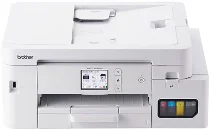
Brother MFC-J4450N Driver lets the computer identify the machine as a colour inkjet all-in-one with print, scan, copy, and fax hardware. After the driver is in place, print jobs can reach the printer with the selected paper and quality settings. The scanner side can also send captured pages back to the computer. USB gives a direct local link, while Ethernet or wireless networking can be used for shared access.
Brother MFC-J4450N Drivers for Windows
80ba5593ec925267fc83ce4cdbf9fc07793a808cce960aa7cadeb72dc6dd00e8aaf73007b2ce61e57400ca56a641f8fe75920cde0fc165fd2ac7d5e56891d6de940f5e4e81dbb3e9162f90a6236fb3b440916812a6205bef0d41fea604df23c1940f5e4e81dbb3e9162f90a6236fb3b440916812a6205bef0d41fea604df23c10edce9170c3f46f065e52aa6335c093befa453212698a94c7d59fcfc5197fa7e0917273bb5bc10ee4775f36bd98bd05152835bf5370614cf5a803ffa9260b0adBrother MFC-J4450N Drivers for macOS
3e25c08d380ad841fda125a40aa6ed20db86bd1a4d2188d1eeed831bfce5b167Brother MFC-J4450N Drivers for Linux
f7055f45742c2150ae91847dabac298373abeb7606ee8cf7aa3c67bb55d795ec05211131ac2d61da7ab9af96dfe9428aa64fdf776ba0243b0f56c0581280d0919c3a200db3dc7b2b3332dff8c5226b4f3ee560d20b2e1f4918b1faf7124517b2197f63a52e89b8744f5a3c2d843abb3b76d003d5d4830bdfe675c44841a6c72bcda25534ea8e3018e7d46b970cb08b36084355adedc933aba0c8c7d03e903db901dc859f1978e645147ced5ec4b5448cc3e26b1c6d2f1104834f5891c0e17469d724746540a51f8286f2a318b47657227f7131d384a1a4f0475dacb7e3580f3ee74ef3a5529ebf3b26d6139ce15d75374a4538ba2efd48c28b209b0d705e5ec72ba3bffcf199fee6387cb79d6923214648db0f2df1c5a13f8f8f0a6fe0995c401404f2622e60470b4de25d0cdb4adc0f130ace6b380cc0d4b3d7714ad761c1aee28a8765f6637456d81ad1a56226e6857be2f1581fdcd9e4a5a4fbc4c42dd3450a4412b306b9ce2eb7e3ef4734a7b648f9561f525922b02541e98b545929dc2b82aa17ba2e331de1fcb34f0a839d27b9b193ac680d9742250a89e588a6bd56206c4e17c6dbcf263d9d08fb460ccd5b9f1a23fce79b30d0a41d96a224839322b2Brother MFC-J4450N Specifications
The Brother MFC-J4450N is a colour inkjet all-in-one with print, scan, copy, and fax functions. Its four separate pigment cartridges use the LC516 and LC516XL series. Local operation runs through a 2.7-inch touch-panel LCD, while document capture combines a flatbed scanner with a 20-sheet automatic document feeder. In stored position, the closed body measures 435 x 343 x 180 mm and weighs about 8.9 kg.
Printing reaches up to 1200 x 4800 dpi. A4 plain-paper output runs at about 20 ipm in monochrome and 19 ipm in colour, while ink-save draft mode rises to about 35 ppm in monochrome and 29 ppm in colour. First-page timing is about 5.8 seconds for black and 5.9 seconds for colour. Borderless printing covers A4, Letter, A6, postcard, index card, L, 2L, and hagaki sizes.
Scanning from the glass reaches 1200 x 2400 dpi optically, and interpolation can rise to 19200 x 19200 dpi through the TWAIN driver. Through the ADF, scanning reaches up to 1200 x 600 dpi. The feeder accepts originals from 139.7 x 148 mm to 215.9 x 355.6 mm. Copying works in colour or monochrome, with 25% to 400% scaling, sorting, stacking, and up to 99 copies from one job.
Paper input comes through a 150-sheet front tray, together with a single-sheet manual feed slot for heavier or occasional media. The tray accepts plain paper, inkjet paper, glossy paper, recycled paper, postcards, index cards, and several envelope formats up to Legal. Finished pages collect in a 100-sheet output area. Connections include Hi-Speed USB 2.0, wired Ethernet, wireless LAN, Wi-Fi Direct, AirPrint, Mopria, and smartphone or tablet printing.
Technical Details
| Title | Brother MFC-J4450N Drivers |
|---|---|
| Device Type | All-in-one printer |
| Driver Version | Varies by driver and operating system |
| Available Downloads | Drivers |
| License | Free |
| Manufacturer | Brother Industries, Ltd. |