
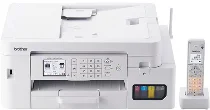
Brother MFC-J4950DN Driver lets the computer identify this colour inkjet all-in-one for printing, scanning, copying, and faxing. After installation, print jobs can reach the machine with the selected paper, quality, and layout settings. Scanned pages can also return to the computer through the proper device interface. Network use can run through a wired connection or wireless setup.
Brother MFC-J4950DN Drivers for Windows
d4eb33fa983b7b0fcfe0663240121f695ac251fdd2ede0087d1c3683b7f535cdd4eb33fa983b7b0fcfe0663240121f695ac251fdd2ede0087d1c3683b7f535cdd4eb33fa983b7b0fcfe0663240121f695ac251fdd2ede0087d1c3683b7f535cdd4eb33fa983b7b0fcfe0663240121f695ac251fdd2ede0087d1c3683b7f535cdd4eb33fa983b7b0fcfe0663240121f695ac251fdd2ede0087d1c3683b7f535cdd4eb33fa983b7b0fcfe0663240121f695ac251fdd2ede0087d1c3683b7f535cdBrother MFC-J4950DN Drivers for macOS
d4eb33fa983b7b0fcfe0663240121f695ac251fdd2ede0087d1c3683b7f535cdBrother MFC-J4950DN Drivers for Linux
d4eb33fa983b7b0fcfe0663240121f695ac251fdd2ede0087d1c3683b7f535cdd4eb33fa983b7b0fcfe0663240121f695ac251fdd2ede0087d1c3683b7f535cdd4eb33fa983b7b0fcfe0663240121f695ac251fdd2ede0087d1c3683b7f535cdd4eb33fa983b7b0fcfe0663240121f695ac251fdd2ede0087d1c3683b7f535cdd4eb33fa983b7b0fcfe0663240121f695ac251fdd2ede0087d1c3683b7f535cdd4eb33fa983b7b0fcfe0663240121f695ac251fdd2ede0087d1c3683b7f535cdd4eb33fa983b7b0fcfe0663240121f695ac251fdd2ede0087d1c3683b7f535cdd4eb33fa983b7b0fcfe0663240121f695ac251fdd2ede0087d1c3683b7f535cdd4eb33fa983b7b0fcfe0663240121f695ac251fdd2ede0087d1c3683b7f535cdd4eb33fa983b7b0fcfe0663240121f695ac251fdd2ede0087d1c3683b7f535cdd4eb33fa983b7b0fcfe0663240121f695ac251fdd2ede0087d1c3683b7f535cdd4eb33fa983b7b0fcfe0663240121f695ac251fdd2ede0087d1c3683b7f535cdd4eb33fa983b7b0fcfe0663240121f695ac251fdd2ede0087d1c3683b7f535cdd4eb33fa983b7b0fcfe0663240121f695ac251fdd2ede0087d1c3683b7f535cdBrother MFC-J4950DN Specifications
The Brother MFC-J4950DN is a colour inkjet all-in-one with print, scan, copy, fax, and cordless telephone functions. Four separate pigment-ink cartridges work through the LC516 and LC516XL series. Local settings run through a 2.7-inch touch-panel LCD, while 256 MB of memory supports the internal controller. Originals can use the flatbed scanner or the 20-sheet automatic document feeder above it.
Printing reaches up to 1200 x 4800 dpi. A4 plain-paper output runs at about 20 ipm in monochrome and 19 ipm in colour, while ink-save draft mode rises to about 35 ppm in monochrome and 29 ppm in colour. First-page timing is about 5.8 seconds for black and 5.9 seconds for colour. Borderless output covers supported photo and postcard sizes.
Automatic duplex printing works with plain A4, A5, and B5 paper. Scanning reaches 1200 x 2400 dpi from the glass, while the ADF scans at up to 1200 x 600 dpi. Copying uses the same colour or monochrome imaging path and can produce up to 99 copies from one job. Paper input comes from a 150-sheet front tray, together with a single-sheet manual feed slot.
The feed path accepts A4, Letter, Legal, B5, A5, A6, postcards, index cards, L, 2L, hagaki, and several envelope sizes. Finished pages collect in a 100-sheet output area. Connections include Hi-Speed USB 2.0, 10Base-T/100Base-TX Ethernet, wireless LAN, and Wi-Fi Direct. AirPrint and Mopria are also listed for mobile printing, while the stored body measures 435 x 343 x 180 mm and weighs about 8.9 kg.
Technical Details
| Title | Brother MFC-J4950DN Drivers |
|---|---|
| Device Type | All-in-one printer |
| Driver Version | Varies by driver and operating system |
| Available Downloads | Drivers |
| License | Free |
| Manufacturer | Brother Industries, Ltd. |