
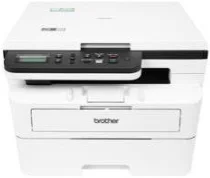
Brother DCP-B7628DW Driver helps the computer communicate correctly with this monochrome multifunction printer during setup. Once the connection is ready, the machine can receive print jobs and return scan requests in the proper form. Copying runs from the printer hardware itself, while the driver keeps computer-side job settings matched with the device response. That matching reduces errors when documents or scanned items move through the chosen connection.
Brother DCP-B7628DW Drivers for Windows
440234bb5c0971097e1d2c8bc3aebeb5a57a07a4d259b85cb77027540398e285df159124802c2fbd77835e50754f1c7c1e30ee7f9c52268de659ce5e0057d06edf159124802c2fbd77835e50754f1c7c1e30ee7f9c52268de659ce5e0057d06ec1e3816b3f9786ddc566d761bd48e165e6e58d7d5c8c41b362139fcc98289a136eddedfff4131bc903d581f6dc86a8518e1c82980a4cd38b4396c4c1bb1338d3ee2cabe92d46f7f6804a469fbdf46bfefbc58df649a126f936d83c3cc990a4efba40f5efe1d1d3896139bc31bc28b4a3f2e75c76684987239019db6a68d6977d5f3ad9dd0475f7524f0e489aa7076da168c228bcd22031394a53fad4b9a2573f71169ef33cab91b5dc1e848ff483c40ad2eec7be44e69fcb0c084a590a79b49eBrother DCP-B7628DW Drivers for macOS
160378fe9fb151dfa62a970c737376b3f6421ed0b365c1d19218a9e0b4442fddBrother DCP-B7628DW Drivers for Linux
f28f798b9dd24b328f77ebd9a6b772276b283ddd288f133d79c42f7736f75558ce08a53f2136c72dbcfa7fc4c7bbc9ffe521f16975d63a751bfd1c10131b23c99c3a200db3dc7b2b3332dff8c5226b4f3ee560d20b2e1f4918b1faf7124517b2197f63a52e89b8744f5a3c2d843abb3b76d003d5d4830bdfe675c44841a6c72bcda25534ea8e3018e7d46b970cb08b36084355adedc933aba0c8c7d03e903db901dc859f1978e645147ced5ec4b5448cc3e26b1c6d2f1104834f5891c0e17469d724746540a51f8286f2a318b47657227f7131d384a1a4f0475dacb7e3580f3ee74ef3a5529ebf3b26d6139ce15d75374a4538ba2efd48c28b209b0d705e5ec72ba3bffcf199fee6387cb79d6923214648db0f2df1c5a13f8f8f0a6fe0995c401404f2622e60470b4de25d0cdb4adc0f130ace6b380cc0d4b3d7714ad761c1ae82aa17ba2e331de1fcb34f0a839d27b9b193ac680d9742250a89e588a6bd56206c4e17c6dbcf263d9d08fb460ccd5b9f1a23fce79b30d0a41d96a224839322b2Brother DCP-B7628DW Specifications
The Brother DCP-B7628DW is a monochrome laser multifunction machine for printing, scanning, and copying. Fax hardware is not listed for this DCP model. Its electrophotographic laser engine works with 256 MB of memory, and the control panel uses a two-line Chinese and English LCD. A 50-sheet automatic document feeder sits above the flatbed for loose multipage originals. The print system uses a TN-B020 toner box with a separate DR-B020 drum.
On A4 paper, printing reaches 34 pages per minute. Letter output runs at 36 pages per minute. Automatic duplex output reaches 16 sides per minute on A4, so two-sided sheets pass back through the engine without manual turning. From ready mode, the first print takes less than 8.5 seconds. Print resolution is 600 x 600 dpi physically and reaches 1200 x 1200 dpi at the highest setting.
Scanning uses a CIS flatbed as well as the automatic document feeder. Loose originals can run through the feeder, while bound or single-page items sit on the glass. The flatbed scans optically at up to 1200 x 1200 dpi. Through the feeder, optical resolution is 600 x 600 dpi. Interpolated resolution rises to 19200 x 19200 dpi through Brother’s scanner utility. Copying prints at 600 x 600 dpi, with up to 99 copies and scaling from 25% to 400%.
Paper input starts with a 250-sheet enclosed cassette. A one-sheet manual feed slot sits apart from it for heavier paper or envelopes. The cassette accepts A4, Letter, B5, A5, A5 long edge, A6, Executive, A4 Short, and 16K paper. Printed pages collect in a 120-sheet output area. A nearby computer can connect through Hi-Speed USB 2.0, while wireless printing runs through dual-band Wi-Fi, Wi-Fi Direct, or mobile printing support. With consumables installed, the body measures 410 x 399 x 319 mm and weighs 12 kg.
Technical Details
| Title | Brother DCP-B7628DW Drivers |
|---|---|
| Device Type | All-in-one printer |
| Driver Version | Varies by driver and operating system |
| Available Downloads | Drivers |
| License | Free |
| Manufacturer | Brother Industries, Ltd. |