
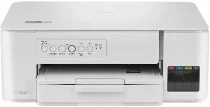
Brother DCP-20W Driver gives the computer the software link needed for this multifunction printer’s printing, scanning, and copying functions. After installation, the system can detect the machine through USB or a wireless connection. Print jobs pass through that device link as command data, while scan and copy tasks rely on the same connection for proper control. Documents, scanned originals, and copied pages can then move through the machine without fax hardware involved.
Brother DCP-20W Drivers for Windows
4fcb65add22f525e210e98675878223896e03316977f8b7da917deb4f392e23488c2859bb73443ee7219e69b64aa9fc96a0851565f03766eb7084941c89941202e77eb5e59f5e6e88af9308da54976c037e98c902e6f14a6e820dc14fb2ee1672e77eb5e59f5e6e88af9308da54976c037e98c902e6f14a6e820dc14fb2ee1670edce9170c3f46f065e52aa6335c093befa453212698a94c7d59fcfc5197fa7e0917273bb5bc10ee4775f36bd98bd05152835bf5370614cf5a803ffa9260b0adBrother DCP-20W Drivers for macOS
33bd12f87286075fa64ce62cef968396d842dfc9d9929f9c2fdf76b85315e5e5Brother DCP-20W Drivers for Linux
a2ecdf623fcaa68a8a945f3c71f1599312af93592238a86dac8cb6f90ef0c498a84c17dbd7690a22282fc288a43f13c0eb56b6f70a10002f1b13979c87b427359c3a200db3dc7b2b3332dff8c5226b4f3ee560d20b2e1f4918b1faf7124517b2197f63a52e89b8744f5a3c2d843abb3b76d003d5d4830bdfe675c44841a6c72bcda25534ea8e3018e7d46b970cb08b36084355adedc933aba0c8c7d03e903db901dc859f1978e645147ced5ec4b5448cc3e26b1c6d2f1104834f5891c0e17469d724746540a51f8286f2a318b47657227f7131d384a1a4f0475dacb7e3580f3ee74ef3a5529ebf3b26d6139ce15d75374a4538ba2efd48c28b209b0d705e5ec72ba3bffcf199fee6387cb79d6923214648db0f2df1c5a13f8f8f0a6fe0995c401404f2622e60470b4de25d0cdb4adc0f130ace6b380cc0d4b3d7714ad761c1ae82aa17ba2e331de1fcb34f0a839d27b9b193ac680d9742250a89e588a6bd56206c4e17c6dbcf263d9d08fb460ccd5b9f1a23fce79b30d0a41d96a224839322b2Brother DCP-20W Specifications
Brother DCP-20W is an A4 colour inkjet multifunction printer for printing, scanning, and copying. Printing comes from a micro piezo inkjet engine with 210 black nozzles and 70 nozzles for each colour. The hardware carries 128 MB of standard memory and draws power from AC 220 to 240 V at 50/60 Hz. A flatbed scanner glass supplies the scan and copy path. With consumables installed, the machine weighs 6.3 kg.
Print resolution reaches up to 1200 x 6000 dpi in Windows on glossy photo paper. On A4 paper, speed is 16.0 ipm in monochrome and 9.0 ipm in colour. Economy mode raises output to about 21 ppm in black and 11 ppm in colour. Droplets are 3 pl for black and 1.5 pl for cyan, magenta, and yellow. Borderless printing covers A4, Letter, A6, Photo, Photo L, Photo 2L, and index cards.
Scanning relies on a CIS flatbed with optical resolution up to 1200 x 2400 dpi. Interpolation can take scan resolution to 19200 x 19200 dpi. The single-sided scan area reaches 213.9 mm across and 295 mm long. Colour scanning records 30-bit input and returns 24-bit output. Copying works in colour or monochrome, makes as many as 99 copies, and prints copies at up to 1200 x 1800 dpi.
Paper input comes through a 150-sheet tray, and a one-sheet manual feed slot takes individual media sheets. Both feeds accept A4, Letter, 16K, Executive, B5, A5, A6, envelopes, photo papers, and index cards. Printed sheets collect in a 50-sheet output tray after leaving the paper path. Connections pair Hi-Speed USB 2.0 with wireless LAN and Wireless Direct, using the supported IEEE 802.11 standards.
Technical Details
| Title | Brother DCP-20W Drivers |
|---|---|
| Device Type | All-in-one printer |
| Driver Version | Varies by driver and operating system |
| Available Downloads | Drivers |
| License | Free |
| Manufacturer | Brother Industries, Ltd. |