
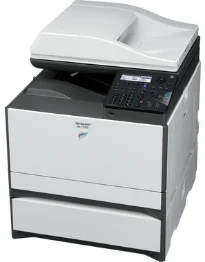
The Sharp MX-C300W printer model is a multifunction printer that is capable of printing, copying, scanning, sending and receiving faxes. At the same time, it is also capable of printing in color as well as black and white. The rate of printing is up to 30 ppm while the minimum paper size is A6, and the maximum is A4. In terms of the paper weight, it depends on the particular paper tray that is in use at present. On the other hand, only the bypass tray allows 55-220 gsm while the other trays allow between 60 and 105 gsm.
Sharp MX-C300W Drivers for Windows
27841356390fded47f60b6df1f38f323a0ad1bd1e08091bead975aa9144eba5d2a8d240f387772c6dd9e24d7b267d672cae37e92cf5700061e9fa4b19175fa91ce35b2a0114d04148a11f8329b5d0b16fbc696ee9a9dfcf7d2165a5c1a749b7ef5620bf115d9d02471126283e44f64575967fa2fb09efb03f3eb974433ca0b64Sharp MX-C300W Drivers for macOS
42d579ca0a39cf747d537b99de80b695a4c2bf3b9e0e35350a85e30778fc9bcca28358c04f943a6a6a640c136ceadd302fc4dbe034e84a1a32a49c5b127bf22fSharp MX-C300W Drivers for Linux
b876cc18d0dac085fadde2f8a7451ba87ea8684484dcec2102150f7d084c062cSharp MX-C300W Specifications
Furthermore, the standard capacity of the printer in total is about 300 plain sheets. But the maximum capacity for plain paper is up to 800 sheets. When the Sharp MX-C300W printer is just coming up, it will take up to 29 seconds for the printer to warm up. At the same time, the memory limit is about 512 MB, together with support for automatic duplex printing. The duplex feature allows the machine to print on both sides of the page.
The printer uses an internal power source within the range of 200 to 240 volts at a frequency of 50/60 Hz. Besides, the physical dimensions include a width of 429 mm, a depth of 509 mm, and a height of 421 mm. The weight of the machine is also about 29 kg, together with an e-sort component. When copying, the device can produce the first-ever copy in about 18 seconds and continue for 999 copies. It also has a copying resolution quality of 600 x 600 dots per inch (dpi) at maximum capacity.
The scanner utilities include the use of the Sharpdesk, Network scanner tool, and the TWAIN component. It also supports the TIFF, PDF, and JPEG color formats for optimum performance. Other features under the scanning specifications include scan to email, scan to folder, scan to USB, and scan to computer SWO.
Technical Details
| Title | Sharp MX-C300W Drivers |
|---|---|
| Device Type | All-in-one printer |
| Driver Version | Varies by driver and operating system |
| Available Downloads | Drivers |
| License | Free |
| Manufacturer | Sharp Corporation |