
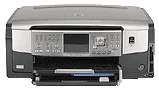
This device is an all-in-one machine with the ability to print, scan, copy and send and receive fax messages. The printing can be from a computer connected directly or through a memory card. Many of the functions of this printer are accessible from the control panel without turning on your computer. Items that stand out on the printer include a control panel, a color graphics display, and an ink cartridge door. Others include a photo tray, a paper tray extender, memory card slots and a photo light, and a paper length guide. There is also the main input tray, output tray, and a wireless radio light as well as a Bluetooth light.
HP Photosmart C7180 Drivers for Windows
df5e7075daa1af2ba3af240d1ed005dc15eab8d55816c8294ce509d7fcf9fe4b3d036f6ba9bd192ccb5ebbe09a610bbe24b7d5fce166c412e772408a47d9cee8274bc95da3686d58e4e9e7f80cee4e5298a6ee7e2db709e5525f8f90b175f0c4a60a2bb24dbd63900111c2a8e7aa8f4364bf2306bc07e41e103e78fe51e44235a9a1dd8f36048071c6033e7d1cc98730005a945c391fa7bf771a815860cadd112b1e1a209a8cfbd56c9689effe25c5f385faec6709c7c35f3b24d3e9560485454ca4bdab78cd183e03ddf4667476938bc38daeb0ce18c8e2088f69adc8fdbe865ca1b0628d787298f2d3cf1cabf6a0b2571a567348071c1d7aa6f1a1ffeacb51d2f18088da8df16f0017983756626431eeeeddb0e386dd19a223c89e5a6a9c4fce728403422ec1c590fb971561abec94e476484815326373058a39afd61bccc2HP Photosmart C7180 Drivers for macOS
144c36115cc04a7e937971bd3df7b64521b1f9ece767ca784b55859fdbd9f7498fd95ca1c86b77e6f9f6a46246d547080063719b692e38d5e46c0e22524b541aHP Photosmart C7180 cartridges
HP02 Black Ink Cartridge (~660 pages ), HP 02 Cyan Ink Cartridge (~400 pages ), HP 02 Magenta Ink Cartridge (~370 pages ), HP 02 Yellow Ink Cartridge (~500 pages ), HP 02 Light Magenta Ink Cartridge (~230 pages ), HP 02 Light Cyan Ink Cartridge (~220 pages )
Printer specifications
1. The printer is compatible with the pre-installed HP Photosmart software for Windows or the HP Photosmart Mac software.
2. Connectivity options include a hi-speed USB 2.0, a wired Ethernet network, and a wireless network with an 802.11 access point. Other means include a wireless network without an access point. Users can also add more computers on the network.
3. The printer supports some media types and sizes. These include transparent films, labels, index cards, envelopes, photo paper and legal paper. The paper holding capacity of the input tray is up to 100 sheets of plain printed paper. However, the output tray holds about 50 sheets of plain paper. Note that the output tray capacity depends on the amount of ink and the type of paper in use. Other paper types have a lesser amount that fills both the input and output trays.
4. The printer has a resolution of 1200 x 1200 rendered dpi black while printing from a computer. To print in color, however, takes a resolution of 4800 x 1200 optimized dpi.
5. The printing method used in this printer is a drop-on-demand thermal inkjet technology with a PCL3 GUI language.
Technical Details
| Title | HP Photosmart C7180 Drivers |
|---|---|
| Device Type | All-in-one printer |
| Driver Version | Varies by driver and operating system |
| Available Downloads | Drivers |
| License | Free |
| Manufacturer | HP Inc. |