
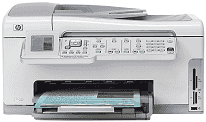
When it comes to smart devices, HP Photosmart C6188 is the one that fulfills all user requirements. This device can serve print, scan, copy and fax functions altogether. It is a lightweight device that can be used for commercial and household needs.
HP Photosmart C6188 Drivers for Windows
df5e7075daa1af2ba3af240d1ed005dc15eab8d55816c8294ce509d7fcf9fe4b3d036f6ba9bd192ccb5ebbe09a610bbe24b7d5fce166c412e772408a47d9cee8274bc95da3686d58e4e9e7f80cee4e5298a6ee7e2db709e5525f8f90b175f0c4a60a2bb24dbd63900111c2a8e7aa8f4364bf2306bc07e41e103e78fe51e44235a9a1dd8f36048071c6033e7d1cc98730005a945c391fa7bf771a815860cadd112b1e1a209a8cfbd56c9689effe25c5f385faec6709c7c35f3b24d3e956048545c28d191ce53ac148a4f15dcac8da14a36704f581507e90ba4bd8e9978ce0592f4ca4bdab78cd183e03ddf4667476938bc38daeb0ce18c8e2088f69adc8fdbe86b35429e08ed1c32c7ddee9cd37b1626a79f6124fc97557bd854a6e88cf682f215ca1b0628d787298f2d3cf1cabf6a0b2571a567348071c1d7aa6f1a1ffeacb51d2f18088da8df16f0017983756626431eeeeddb0e386dd19a223c89e5a6a9c4fce728403422ec1c590fb971561abec94e476484815326373058a39afd61bccc2HP Photosmart C6188 Drivers for macOS
144c36115cc04a7e937971bd3df7b64521b1f9ece767ca784b55859fdbd9f74929b30aa2367dca95a1bf75b280940e305180c857f652aca899362d8b682421b1HP Photosmart C6188 Specifications
The printer weighs about 21 pounds. The physical dimensions are 18 in height, 19.4 in width, and 17 in depth. It is pretty easy to put the printer around the house or any other area.
The print function works on drop-on-demand thermal inkjet technology. It has a panorama-size printing feature that can print at a rendered black resolution of up to 1200 x 1200 dpi. And for the optimized color dpi, the HP Photosmart C6188 printer can handle 4800 x 1200 dpi. Still, the printing speed is highly dependent on the complexity of the documents.
While the Copy specification includes the digital image processing, it can also zoom the documents up to 400%. The device can be used to make 99 copies from the original document. As for the Scan and Fax functions, both are pretty useful. The scanner allows the users to edit the documents according to their needs. And the fax feature can send and receive a fax with a faster and better transmission speed of 33.6 Kbps. Moreover, it also has an answering machine for fax.
As for the Power consumption, the printer consumes an average of 50 watts maximum. It has a minimum requirement of 100/240 VAC input voltage with 5-60 Hz frequency. And the output voltage is DC 32 V. The printer is not designed to face extreme weather conditions. Therefore, it is recommended to keep it in ideal conditions. The users can store it within the temperature range of -40°C to 60°C. Although the device can withstand high and low temperature ranges, it will smoothly work when kept in 15 °C to 32°C range.
Technical Details
| Title | HP Photosmart C6188 Drivers |
|---|---|
| Device Type | All-in-one printer |
| Driver Version | Varies by driver and operating system |
| Available Downloads | Drivers |
| License | Free |
| Manufacturer | HP Inc. |