
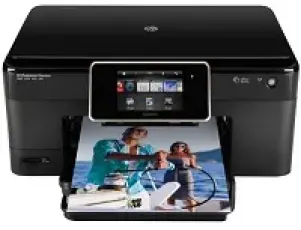
This product is unique in its function as it can not only print but also copy and scan. Its model part number is CN503C. The physical dimensions are suitable for both office and home uses. These include 7.83 inches of height, 17.8 inches of width and 15.4 inches depth. The equivalent weight is 16.4 lbs.
HP Photosmart C310b Premium Drivers for Windows
193da2db2f082ac0ac7cef338faf0b9af781facec69d07dfd7ba8ef436123f006d8ba4ffd512258f22bc2797c6b203843f5d4e77c10fc6d42f0708407ba634e1a02aa21d05bc6fb339b4f6f62381bc8857564966da37587eb2be16e13274e36cce728403422ec1c590fb971561abec94e476484815326373058a39afd61bccc2d2f18088da8df16f0017983756626431eeeeddb0e386dd19a223c89e5a6a9c4fHP Photosmart C310b Premium Drivers for macOS
8fd0d893247553d5c61cac5067c55feb58b02b17b863335f6257a0f46853fc866161dc8dfe40021f8afaf0245c8712eb202f4c6c077b64f54a90d341d9ab70ddcba1598dc5d03fbf28fa649dafca5cd251f273066cc3a050966834a73ba66c3eHP Photosmart C310b Premium HP Photosmart C310b cartridges.
HP564 Black Ink Cartridge (~250 pages ), HP 564 Cyan Ink Cartridge (~300 pages ), HP 564 Magenta Ink Cartridge (~300 pages ), HP 564 Yellow Original Ink Cartridge (~300 pages ), HP 564 Photo Original Ink Cartridge (~130 pages )
Specifications
The system requirements for HP Photosmart C310b Premium driver involves Microsoft Windows XP (Home, Professional, Media Center Edition and Tablet PC Edition). This feature pertains to SP 1 or later versions with only 32-bit compatibility. Other compatible versions of Windows include Windows Vista, and Windows 7 (32-bit and 64-bit).
XP version of Windows requires an Intel Pentium II processor in the least, 128 MB of RAM and there must be a 250 MB of hard disk free space. Also, the compatible web browser is the Internet Explorer 6.0 or later versions. However, Windows Vista and Windows 7 require a minimum of 800 MHz, (32 or 64-bit processor). The manufacturer though recommends a 1 GHz processor and a 1GB of RAM with 700 MB free hard disk space.
For users with Mac systems, the supported versions include Mac OS X v.10.5.8, Mac OS X v.10.6, v.10.7, and v.10.8. They require a PowerPC G4, G5 or Intel Core processor and a 300 MB of hard disk free space.
The use of cartridges depends on the regions of the world where the printer is in use. For instance, China and India, the cartridge is HP862, Western Europe uses an HP 364. Whereas, in Africa, Japan, CIS and the Middle East, HP 178 is in use.
There are various means of input/output (connectivity) which includes memory cards. Examples of such memory cards are MMC, Memory Stick, SD, TransFlash, Secure Digital Mini, SDHC, etc. other connection options include the real hi-speed USB port and the wireless network connection.
Technical Details
| Title | HP Photosmart C310b Premium Drivers |
|---|---|
| Device Type | All-in-one printer |
| Driver Version | Varies by driver and operating system |
| Available Downloads | Drivers |
| License | Free |