
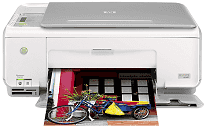
Every Company and Business needs a single device which is capable of performing multiple functions. The Photosmart C3180 is an all-in-one multifunction printer that lets the user easily print, copy and scan a document. In this printer, it has the video display of 800×600 monitor with 16-bit color. This printer has a duty cycle of 3000 pages per month. It supports the different types of pages such as Plain Paper, legal Paper, Cards, Envelopes, and Labels, etc.
It is compatible with various types of Microsoft Windows operating systems. The processor required for Windows 2000 or XP is an Intel Pentium 2 with 128 MB RAM. And a modern 800 MHz 32-bit processor is needed for Windows Vista with 512 MB RAM. HP Photosmart C3180 printer is also compatible with the Macintosh operating system. For both Mac versions, the G3 processor is required, with 128 MB RAM.
HP Photosmart C3180 Drivers for Windows
4a93c5c146568e0e35315907eb257f532af8dd5e3e0e823a835e418f654611a416db7d5bf03a99114e2d1dcda3fb5d9f8f221022e4aced21313f182470379927ef9d674c9f825c1d806bae8ea4c09b2f0d4d53c2e1744f4bd8e11c2aadd703bdc5274af60c4d54d0bc0f4cec71c82a0283631275eab2e7066a6682a235977cf6afc06643f088eaedffe4dcf9afce652871ca64c48491b89484d08ea70b7ae4522b1e1a209a8cfbd56c9689effe25c5f385faec6709c7c35f3b24d3e95604854511310a37c7e840c28a01d6c41928c02079104a8b7cd5f08e2a781cd65068b7ba0ab16a1f1f369ff18af3641a29fe63e4d2f53002a45aeae177da5ba99d560ae1HP Photosmart C3180 Drivers for macOS
144c36115cc04a7e937971bd3df7b64521b1f9ece767ca784b55859fdbd9f749c11b91148b5d3d0672e896590b2f14db3f7e380e10b1704b360d5eeb7742fc30HP Photosmart C3180 HP Printer Photosmart C3180 cartridges
HP74 Black Original Ink Cartridge (~200 pages), HP 75 Tri-color Original Ink Cartridge (~170 pages)
Printer features
1. The speed of printing a document of this printer is up to 30 ppm for black and 24 ppm for color.
2. Resolution of black print is 1200×1200 dpi (dots per inch) and 4800×1200 dpi for color.
3. Paper tray capacity of the printer is up to 100 sheets of plain paper in the input tray and 50 sheets of plain paper in the output tray.
4. In this printer, the scanning resolution is 1200×2400 dpi optical and 19200 dpi enhanced (software).
5. The user can easily edit any scanned text with the Integrated Optical software.
6. The speed of scanning in this printer varies according to document complexity.
Features of HP Photosmart Printer C3180:
1. It comes in a very compact size.
2. It supports memory cards like Memory Stick, Duo, Pro, and SD.
3. This printer supports different paper sizes such as A4, A2, DL, and A6, etc.
Technical Details
| Title | HP Photosmart C3180 Drivers |
|---|---|
| Device Type | All-in-one printer |
| Driver Version | Varies by driver and operating system |
| Available Downloads | Drivers |
| License | Free |
| Manufacturer | HP Inc. |