
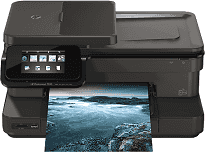
This device is an all-in-one printer that can print, scan, copy and also send and receive fax documents. It is also a unique device that comes with three different part numbers: CZ025A, CZ045A, and CZ045B. Along with this particular printer is the HP Photosmart 7525 all-in-one printer with part number CZ046A. The physical dimensions include 7.5 x 17.25 x 14 inches (HWD) and a weight of 14.06 pounds. The connectivity options of this device include Hi-speed USB 2.0, wireless and wireless direct connectivity.
The input paper tray holds up to 120 sheets of plain paper while the output tray holds up to 50 sheets. Note that other types of media are in fewer amounts in the trays due to their weights.
HP Photosmart 7520 Drivers for Windows
328545046ee7673966939d77adcadd910b1d3f1ff80132f5232f5196d23be87c939f931131862a751073e54721cadb86aaf9dfeb67ac9325ec2887b2c7688b679c5bd3e7661c661937fa044d94dbab0bda1cd55d04899d6314be54876940aed7d2f18088da8df16f0017983756626431eeeeddb0e386dd19a223c89e5a6a9c4fce728403422ec1c590fb971561abec94e476484815326373058a39afd61bccc2e2a9a96fe5fd24d2cbc8868efaa9de956f88983424e4abe9222281383765316665600b3146322a625534e02a701fc04e05403b71f61f358d6358f868ffc1c676HP Photosmart 7520 Drivers for macOS
99e1d18847c64a405486ae34424f0a1c8d89920d17df86c45b6b0007f101d70a9697ded10da592da3b8d009da7abf6e976f295f21bad157c4a200758c0262a1eafe0acc7dcc5aeeda6b65dd598c73ffc80580df3972103f8680a266be127bd0dHP Photosmart 7520 cartridges
HP564 Black Ink Cartridge (~250 pages), HP 564 Cyan Ink Cartridge (~300 pages), HP 564 Magenta Ink Cartridge (~300 pages), HP 564 Yellow Original Ink Cartridge (~300 pages), HP 564 Photo Original Ink Cartridge (~130 pages)
Printer features
1. One of the unique properties of this printer is its mobile printing capability which includes HP ePrint and Apple AirPrint.
2. Supported Ink cartridges include HP 564, HP 364, HP 178 and HP 862. All these cartridges, however, are specific to different regions of the world.
3. The HP Photosmart 7520 printer is compatible with some media types including plain paper, photo paper, executive, etc.
4. The printer supports automatic duplexing that enables it to print on both sides of the paper.
5. The printing method is drop-on-demand thermal inkjet printing technology with PCL3 GUI language.
6. The resolution of this printer output depends on the print mode of the device. For example, at the Plain-best mode, the black and color print is at a resolution of 600 x 1200 dpi. However, the maximum dpi mode is 4800 x 1200 optimized dpi with an input of 1200 x 1200 dpi.
Technical Details
| Title | HP Photosmart 7520 Drivers |
|---|---|
| Device Type | All-in-one printer |
| Driver Version | Varies by driver and operating system |
| Available Downloads | Drivers |
| License | Free |
| Manufacturer | HP Inc. |