
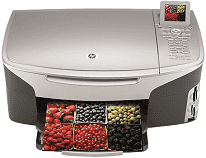
The HP Photosmart 2608 All-in-One Printer can execute functions such as scanning, printing and faxing the documents. It supports various ink cartridges such as black, tri-color and gray photo. This all in one also works with memory cards, unlike some drivers. It can also connect with USB for printing any documents.
For scanning, it includes an image editor and integrated OCR software. The scanning speed changes according to the document complexity. The optical scanning resolution is up to 2400×4800 dpi, and enhanced scanning resolution is up to 19,200 dpi.
HP Photosmart 2608 Drivers for Windows
9de4bc6aa17163d278e5d9ee04c26b4ecaff5775d9b5918d0e7797989309b9db4dbb26746b9351e47fb394cdc45f56833caf12cbdda676bc3ea6bab3cdd72b25def7892aec84b4cd3ecff5a90bb603ad18ea18cfc6ebab825e3872415f06ab5e57dd0470c4392720d0d1125a6c3fb21b03bbc11601c79e7e12a34565487fbc4803fda3d3937d495b68943880e516f87760e8ce164e442d43eeaa0a856700c320HP Photosmart 2608 Drivers for macOS
990c971e9f7a0aa03e9270fe67df8c773bca17c56281f272a91b75dc2cc4b682306a66f37a4257e478e70a5df9d57b6813a7e0168fd165b72fa9ab795e9da28fHP Photosmart 2608 HP All-in-One Photosmart 2608 cartridges
HP94 Black Original Ink Cartridge (~480 pages ), HP 96 Black Inkjet Print Cartridge (~860 pages ), HP 95 Tri-color Inkjet Print Cartridge (~330 pages ), HP 97 Tri-color Original Ink Cartridge (~560 pages ), HP 99 Photo Original Ink Cartridge (~130 pages ), HP 100 Gray Photo Original Ink Cartridge (~80 pages )
HP Photosmart 2608 driver works with various Windows versions such as Windows 98, Windows ME, Windows 2000 and Windows XP. It is also compatible with Mac versions such as Mac OS 9 and Mac OS X.
Features of HP Photosmart 2608:
Printing Technology:
It uses thermal inkjet printing technology for printing documents.
Printing Language:
The printing languages that HP Photosmart 2608 driver supports are HP PCL 10, HP PCL3 GUI and HP PCL Level 3.
Copy Function:
The copy resolution on black paper is up to 600X1200 dpi and on the color page is up to 4800X1200 dpi. Its digital zoom capacity is up to 400%.
Faxing:
HP Photosmart 2608 driver can fax black, white and color pages. It can fax multiple pages manually. The automatic redial options are also included in the driver.
Input tray:
Photosmart printer 2608 has an input tray capacity for plain and legal paper up to 150 sheets. For cards and labels, it is up to 30 sheets and for envelopes it is up to 20 sheets.
Output tray:
The output tray handling capacity for plain and legal paper is up to 50 sheets. For labels and cards, the output tray capacity is the same as the input tray.
Paper type:
It supports numerous media types such as transparency films, envelopes, cards, custom, and photo.
Technical Details
| Title | HP Photosmart 2608 Drivers |
|---|---|
| Device Type | All-in-one printer |
| Driver Version | Varies by driver and operating system |
| Available Downloads | Drivers |
| License | Free |
| Manufacturer | HP Inc. |