
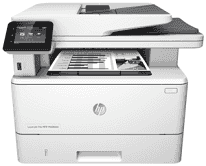
This multifunctional printer is a printer built with a color touchscreen control panel and a speed of 38 pages per minute (ppm). The speed on A4 is 40 pages per minute. It contains job storage and private printing, and walk-up USB printing. This printer copies up to 26 pages per minute (ppm) and can scan up to 26 pages per minute (ppm).
It also scans and copies 50 pages using the automatic document feeder with dual head scanning for single-pass duplex. It offers 50-page automatic document feeder simplex copying and scanning, scan to E-mail, scan to USB and scan to Network Folder options.
HP LaserJet Pro MFP M426fdn Drivers for Windows
d894c22b7eed0e70fcf3c00f706c89ae278fbc828c8832b4b8f8ac0834589511f55fa4ec1f3e4a884057ec389c4b62b0c27c6183f72cc0d6ba137f0ed94d3410d7a0bb0f976d0cfce66c2e28ac2b91fdcb32025a5b45dbc419ac6562dfd7980b9eb7b6aa9dcde6445271182653a7815f9d651cf6fd9478913c5d1f61c9d570b41d3e212d6a13f45a4ae8e3a0624583ce41cfdda7f866e318235488516662e5451bc38a6eb350c4e72aa3018d3c5fe1005056d3b5ebf319508a8d8323ebd66314a98998fa5761c1a057f8402ed8fae15f0f35cbefbba837d2942cc49954137d4365600b3146322a625534e02a701fc04e05403b71f61f358d6358f868ffc1c676HP LaserJet Pro MFP M426fdn Drivers for macOS
99e1d18847c64a405486ae34424f0a1c8d89920d17df86c45b6b0007f101d70aHP LaserJet Pro MFP M426fdn toner cartridge.
HP26A black LaserJet Toner Cartridge (~3100 pages )
HP LaserJet Pro MFP M426fdn driver works perfectly with Microsoft Windows XP SP2 or later, 32-bit, Windows Vista 32-bit, and 64-bit. It also supports Windows Server 2003 SP1 or later, 32-bit, Windows 7 32-bit and 64-bit and Windows 8, 32-bit/64-bit. Also, it supports Windows 8.1, 32-bit and 64-bit, Windows 10, 32-bit and 64-bit, Windows Server 2008 SP2, 32-bit. Also, there is support for Windows Server 2008 R2, SP 1, 64-bit.
Drivers are available for Windows XP to Windows 11 and macOS 10.9 to 13 in the download section on this page. These are useful for Mac Computers and Apple mobile devices.
Tray 1 of the printer accommodates up to 100-sheet capacity; tray 2 has a 250-sheet capacity. The optional Tray 3 holds about 550 sheets capacity of the paper. Connection involves 10/100/1000 Ethernet LAN connection with ipv4 and ipv6. Others are Hi-speed USB 2.0 Walk Up USB port, and print server for wireless network connectivity. It also supports Wi-Fi Direct for printing from mobile devices.
The dimension of the printer includes a Height of 452 mm (closed) and 577 mm (open). It also consists of a Depth of 390mm (open) and 839 mm (open). Also, it has a Width, 420 mm (closed) and 453 mm (open) and weight, 13.1 kg.
Technical Details
| Title | HP LaserJet Pro MFP M426fdn Drivers |
|---|---|
| Device Type | All-in-one printer |
| Driver Version | Varies by driver and operating system |
| Available Downloads | Drivers |
| License | Free |
| Manufacturer | HP Inc. |