
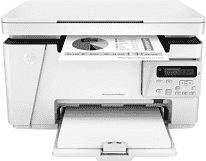
The HP LaserJet Pro MFP M26nw printer model has a product number of T0L50A. Also, the present accessories in the package include the machine with a preinstalled HP original introductory black LaserJet toner cartridge. Other items are the getting started guide, a setup poster, support flyer, warranty guide, and software drivers and documentation. In terms of the connectivity of the printer, the options cover a hi-speed USB2.0 port and a built-in Ethernet 10/100base-TX.
HP LaserJet Pro MFP M26nw Drivers for Windows
676f9c02e20396d1b5b010299f4cbaabe5e11908926178a2ed2676dd20ace2e114afc81fa9e9a3a971aeb460aa202e9f86bf7f5300c934fddb94202232049ad2a175b2f54c0118b0ecebd8023b0e62d5ef4261dc62495d1df7865b7d860544a6HP LaserJet Pro MFP M26nw Drivers for macOS
99e1d18847c64a405486ae34424f0a1c8d89920d17df86c45b6b0007f101d70aIt also has an inbuilt Wi-Fi 802.11b/g/n as the wireless capability feature of the HP LaserJet Pro MFP M26nw machine. While the copying feature is on, users are free to choose the number of copies and adjust the contrast. Other features include a zoom range for reduction or enlargement, size selection and choice optimization for draft, text, and image. The zoom range is between a minimum of 25% and a maximum of 400% with an average speed of 18 CPM. Also, it has a copy resolution of up to 600 x 400 dots per inch (dpi).
In furtherance, the acoustic emission of power in this printer is about 6.2 B(A). In terms of the humidity range, the acceptable range is between 30 and 70% without condensation. Also, the storage humidity is between 10 and 90% without condensation. The recommended operating temperature range is between 17.5 and 25°C and -20 to 60°C for storage purposes. It is also quite crucial that the environment is mercury-free.
HP LaserJet Pro MFP M26nw model also has internal memory with a standard value of 128 MB of RAM. Also, it supports the HP ePrint and Mopria certification as the mobile printer service options. The network protocols through a built-in network solution include TCP/IP, IPv6, IPv4, LPD for raw queue support only. Printing is also made easy with an input paper load capacity of 150 sheets and output load of 100 sheets.
Technical Details
| Title | HP LaserJet Pro MFP M26nw Drivers |
|---|---|
| Device Type | All-in-one printer |
| Driver Version | Varies by driver and operating system |
| Available Downloads | Drivers |
| License | Free |
| Manufacturer | HP Inc. |