
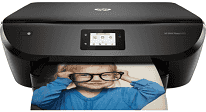
This HP ENVY Photo 6255 printer belongs to the HP Envy series and also has a unique design that favors photo printing. The printer is also an all-in-one device that can print, scan, and copy documents with impressive output. The product number of the device is K7G18A, and this identifier creates uniqueness for the product. The printer package box contains, in addition to the machine itself, an ink caution flyer, a power cord, a setup card and getting started guide. It also has an instant ink flyer, a media pack and HP 64 setup black and tri-color instant ink ready print cartridges.
HP ENVY Photo 6255 Drivers for Windows
edd4cd5e056826883e90d92c024e36f2330bdccdec0ebfaa4c86a3c1b7b644655b137f9c74ea37b9b1a2fb3808650e5585091bdb07b69e8a07f49193108d08799f863f0fe9378254cce1decbafb67a73f6d69207fb33e026222cf3b4d95915dcf50dad657f400372a066f31d5596db54ad4d289fdcdaf11f1209f7c83f8ebfaef50dad657f400372a066f31d5596db54ad4d289fdcdaf11f1209f7c83f8ebfaef50dad657f400372a066f31d5596db54ad4d289fdcdaf11f1209f7c83f8ebfaeHP ENVY Photo 6255 Drivers for macOS
99e1d18847c64a405486ae34424f0a1c8d89920d17df86c45b6b0007f101d70aHP ENVY Photo 6255 Replacing Cartridges
HP 303 Black Original Ink Advantage Cartridge (Paper yield ~120 pages); HP 303 Tri-color Original Ink Advantage Cartridge (Paper yield ~100 pages); High Yield Black Original Ink Advantage HP 303XL Cartridge (Paper yield ~300 pages); High Yield Tri-color Original Ink Advantage HP 303XL Cartridge (Paper yield ~300 pages).
The black ink cartridge can print on up to 185 pages of paper while the tri-color prints 120 pages at normal mode. The standard connectivity means of HP ENVY Photo 6255 printer include the USB 2.0 port, a WiFi 802.11 b/g/n. It also has a dual-band WiFI that runs at a speed of 2.4 or 5 GHz with the built-in component. Copying is easy with this machine as it can copy both black and color documents in no time at all. Also, the maximum number of copies the printer can work on is up to 50 copies at once. The copy speed on an A4 in draft mode is up to 21 copies per minute (CPM).
The copy resolution, conversely, is about 300 x 300 dots per inch (dpi), on average. The print technology in this modern printer is the HP thermal inkjet method with automatic duplex printing. This feature enables the machine to print on both sides of the page by itself. The print speed in black, according to ISO standards, is up to 13 pages per minute (ppm). On the other hand, the rate in color is only 8 ppm while the maximum print area is about 209.9 x 349.6 mm.
Technical Details
| Title | HP ENVY Photo 6255 Drivers |
|---|---|
| Device Type | All-in-one printer |
| Driver Version | Varies by driver and operating system |
| Available Downloads | Drivers |
| License | Free |
| Manufacturer | HP Inc. |