
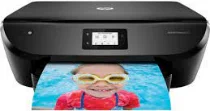
When using the HP ENVY Photo 6222 model, users have the opportunity to use the multifunctional features of the machine, including scanning, printing, faxing, and copying. The HP ENVY Photo 6222 also works with an internal print driver for various supported operating system versions, including macOS and Windows. This same driver can also support the HP PCL 3 GUI print language and automatic duplex printing. In terms of the connectivity features, the options include a hi-speed USB 2.0 port and Wi-Fi 802.11b/g/n.
HP ENVY Photo 6222 Drivers for Windows
edd4cd5e056826883e90d92c024e36f2330bdccdec0ebfaa4c86a3c1b7b644655b137f9c74ea37b9b1a2fb3808650e5585091bdb07b69e8a07f49193108d08799f863f0fe9378254cce1decbafb67a73f6d69207fb33e026222cf3b4d95915dc2f92fdda886ff61322267491d919546ee90c5c8a688eaf9d89f24a8cde5b5c842f92fdda886ff61322267491d919546ee90c5c8a688eaf9d89f24a8cde5b5c842f92fdda886ff61322267491d919546ee90c5c8a688eaf9d89f24a8cde5b5c84HP ENVY Photo 6222 Drivers for macOS
99e1d18847c64a405486ae34424f0a1c8d89920d17df86c45b6b0007f101d70aHP ENVY Photo 6222 Specifications
Copying with this machine can work for both black and color documents. At the same time, it can work with a maximum of 50 copies from a single original composition. The copy speed is up to 21 copies per minute (CPM) in the draft mode when using A4 paper. Also, the copy quality resolution is up to 600 x 600 dpi. The acoustic power emissions are about 6.1 B(A) for monochrome printing, simplex in the normal mode.
The acoustic pressure emissions are about 53 dB(A) under similar conditions. Its operating humidity ranges between 20 and 80% with no condensation. Besides, the non-operating humidity range is between 10 and 90%. On the other hand, the recommended temperature range during print operation is between 15 and 32°C. The storage temperature range of this machine ranges between -40 and 60°C, and its internal memory is not more than 256 MB DDR3 type.
HP ENVY Photo 6222 printer model also supports mobile printing services such as HP ePrint, Apple AirPrint, Wireless direct printing, and Mopria certification. Its network protocols also include IPv6, IPv4, mDNS, Custom Raw Port, embedded web server, WS-print, and Bonjour. It also has the main input tray that can hold up to 125 sheets, 40 cards, or five envelope sheets. However, the output slot can take up to 25 sheets of printed paper under ideal conditions.
Technical Details
| Title | HP ENVY Photo 6222 Drivers |
|---|---|
| Device Type | All-in-one printer |
| Driver Version | Varies by driver and operating system |
| Available Downloads | Drivers |
| License | Free |
| Manufacturer | HP Inc. |