
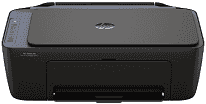
HP DeskJet Ink Advantage Ultra 5127 Driver enables the computer to work with the printer for printing, scanning, and copying. The software identifies each function so print jobs reach the print system and scan requests reach the scanner. A computer on the same wireless network can communicate with the printer over Wi-Fi. For a direct wired connection, the printer can instead use USB.
HP DeskJet Ink Advantage Ultra 5127 Drivers for Windows
eb3000d0a1ed330e752593cfa8ca1783bc272ec66115a5c87407c9f816d07eff620068045902345004931235f980d18321eb73b2b9e83672a905b17b6e82367733a48d17157441a5f626bf8b2b5f85c04c1a524bacff1c548f899ad90978765ec11fe40d2b794ffeb0c9f87b6f22efe7b178646c583b58276f0dc4b24872778a83d239d64aa753b224ac1a5c229527fba7a264eb3653fb95af54a387b27b3b1bHP DeskJet Ink Advantage Ultra 5127 Specifications
The HP DeskJet Ink Advantage Ultra 5127 combines colour printing with flatbed scanning and copying; fax hardware is not fitted. Printing comes from HP Thermal Inkjet technology using one black cartridge and one tri-colour cartridge. Originals for copies or scans sit directly on the flatbed, so each page must be placed by hand. An icon LCD forms the control panel, backed by 64 MB of DDR1 memory.
Black documents can print at up to 1200 x 1200 rendered dpi. For colour, resolution rises to 4800 x 1200 optimized dpi when printing from a computer on selected HP photo paper. ISO speeds on A4 are 7.5 ppm for black and 5.5 ppm for colour. Draft mode is quicker at 20 ppm black and 16 ppm colour, although it trades print quality for speed. The CIS scanner reads originals at up to 1200 dpi optically.
The input tray holds 60 sheets, but the output tray takes only 25, so longer jobs may need pages removed as they print. A4, B5, and A6 paper fit the feed, as do DL envelopes. Custom sheets can run from 76 x 127 mm up to 215 x 355 mm. Automatic duplex hardware is absent; two-sided jobs rely on manual page turning through the printer driver. Borderless printing is not listed for this model.
A nearby computer can connect through the Hi-Speed USB 2.0 device port. For wireless jobs, the printer can join 2.4 GHz or 5 GHz networks using 802.11a/b/g/n. Phones and tablets can print through the HP app, Apple AirPrint, Mopria, or HP Print Service Plugin. With the trays closed, the body measures 425 x 304 x 154 mm. Extending the output area increases the depth to about 546.6 mm, and the printer weighs roughly 3.42 kg.
Technical Details
| Title | HP DeskJet Ink Advantage Ultra 5127 Drivers |
|---|---|
| Device Type | All-in-one printer |
| Driver Version | Varies by driver and operating system |
| Available Downloads | Drivers |
| License | Free |
| Manufacturer | HP Inc. |