
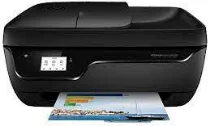
HP Deskjet Ink Advantage 3836 is a powerful All-in-one color compact printer. With this fantastic HP printer, anyone can effortlessly tackle any type of scanning, copying, or printing job. Like other printers, Wi-Fi is enabled on this printer by default, which allows the user to print the document using HP mobile cloud printing service wirelessly. This printer offers premium quality, and its compact size allows it to fit into your space without any problem. This AIO printer is designed to produce prints at a decent speed without compromising the quality of the output document print.
HP DeskJet Ink Advantage 3836 Drivers for Windows
5ee6abec3f965c53ac85d1540281dad84d2ef16b021de4bca4768c68ffa1997285792275e038c2f466af41a98bdcc3be505e23031b70c513b196c52fe0b5ecbb7c862ed0b7e365bdb2230097a167e382727605e99d645c971e60884ce9cd60795ea337fa674fe7abf634fc8f2f330c16dd36a0ef61d8877149995c11f41358f2bc461090240b9ef51908e76ecb614931ed0c445e332f63423a68fb425c7ef514d2f18088da8df16f0017983756626431eeeeddb0e386dd19a223c89e5a6a9c4fce728403422ec1c590fb971561abec94e476484815326373058a39afd61bccc2801af1865ce9ad800df8cbf014288cdb5b9d4da26d3c4c9b3fea83a07409eec9801af1865ce9ad800df8cbf014288cdb5b9d4da26d3c4c9b3fea83a07409eec9801af1865ce9ad800df8cbf014288cdb5b9d4da26d3c4c9b3fea83a07409eec9HP DeskJet Ink Advantage 3836 Drivers for macOS
99e1d18847c64a405486ae34424f0a1c8d89920d17df86c45b6b0007f101d70aHP DeskJet Ink Advantage 3836 All-in-One Printer cartridges
HP664 Black Ink Cartridge (~120 pages), HP 664 colour Ink Cartridge (~100 pages)
Specifications
According to HP, the main feature of this printer is its all-in-one performance including copying, scanning, E-printing, Airprinting, and HP Instant Ink. Engaging with HP instant ink, you will never run out of ink; you have to enroll in HP instant ink. When we talk about E-Printing, the available HP mobile app makes wireless printing easier by using the smart mobile phone. You can Air print using your iPhone or iPad Wi-Fi direct function. You will find a small LCD touchscreen on the left side of the printer.
HP Deskjet Ink Advantage 3836 also has an ADF (Automatic Document Feeder). ADF is a hardware component that is attached to the top of the printer which allows the user to get both side printing. This printer can perform duplex printing for both Color as well as black and white document.
The HP Deskjet Ink Advantage 3836 can print up to 10 pages per minute and 7.5 color pages per minute, which is not good enough in this price range. After testing the HP Deskjet Ink Advantage 3836, we find it prints around 11 grayscale pages per minute, which is impressive because it exceeds the HP claim. But sadly, the color printing is very slow when we compare it with others. Printing 5 black-and-white duplex pages from a mobile device took around 2 minutes. On the other hand, from a PC it took 1 min 30 secs for the same amount of duplex printing.
There are many different types and sizes of paper that can be used with HP Deskjet Ink Advantage 3836 including A4, A5, A6, B5, and borderless paper is also supported. It prints not only documents but also other paper types such as Cards and Envelopes.
Technical Details
| Title | HP DeskJet Ink Advantage 3836 Drivers |
|---|---|
| Device Type | All-in-one printer |
| Driver Version | Varies by driver and operating system |
| Available Downloads | Drivers |
| License | Free |
| Manufacturer | HP Inc. |