
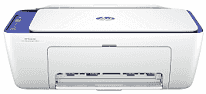
HP DeskJet 4227e Driver lets your computer communicate properly with this all-in-one printer for everyday printing, scanning, and copying. A correct driver helps the system recognize the printer whether it connects by USB or over a wireless network. That recognition reduces communication problems when sending documents or photos. The scanner and copier also rely on the driver so their functions are available from compatible software.
HP DeskJet 4227e Drivers for Windows
d139a05476eee498e57d9dc4137e1b5919e33c91163ba39f96d4cfcd3205d698620068045902345004931235f980d18321eb73b2b9e83672a905b17b6e82367733a48d17157441a5f626bf8b2b5f85c04c1a524bacff1c548f899ad90978765ec11fe40d2b794ffeb0c9f87b6f22efe7b178646c583b58276f0dc4b24872778ad139a05476eee498e57d9dc4137e1b5919e33c91163ba39f96d4cfcd3205d698HP DeskJet 4227e Specifications
Printing, scanning, and copying come from HP Thermal Inkjet technology paired with a two-cartridge system that uses one black cartridge and one tri-color cartridge. The front panel carries a small LCD icon display for basic status checks, and physical buttons take care of everyday controls. Scanning uses a flatbed for single sheets, while a 35-sheet automatic document feeder keeps multi-page jobs moving without constant attention.
Black documents print at up to 1200 x 1200 rendered dpi. Color photos can reach an optimized resolution of up to 4800 x 1200 dpi on supported HP photo paper. Print speed reaches up to 8.5 ISO pages per minute in black or 5.5 in color. The scanner captures originals at an optical resolution of up to 1200 dpi. Copying is limited to nine duplicates from one original, and borderless printing is not available. Two-sided pages also need to be turned by hand because automatic duplex hardware is not fitted.
The rear input tray holds up to 60 sheets, and finished pages collect in a 25-sheet output tray. That capacity suits everyday home documents better than long unattended print runs. The same paper path accepts A4, B5, A6, and DL envelopes. Photo paper, brochure paper, and other compatible inkjet media also feed from the tray. The automatic document feeder takes up to 35 originals, reducing the need to place every page on the flatbed individually.
A nearby computer connects with Hi-Speed USB 2.0. For wireless jobs, the built-in single-band 2.4 GHz Wi-Fi 802.11b/g/n radio works over the home network, and compatible mobile devices can print with Apple AirPrint, Mopria, ChromeOS, or the HP app. With the trays closed, the body measures about 428 × 332 × 200 mm and weighs around 4.82 kg. The monthly duty cycle is rated at up to 1,000 pages, although HP recommends keeping regular output between 100 and 300 pages for routine use.
Technical Details
| Title | HP DeskJet 4227e Drivers |
|---|---|
| Device Type | All-in-one printer |
| Driver Version | Varies by driver and operating system |
| Available Downloads | Drivers |
| License | Free |
| Manufacturer | HP Inc. |