
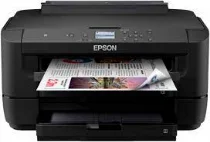
The Epson WorkForce WF-7210DTW printer model is compatible with a PrecisionCore print head. The ink technology is the DURABrite Ultra component that makes it ideal as a home and office printer. In addition, the nozzle configuration involves 800 nozzles for black printing and 256 nozzles for color printing. Also, the minimum droplet size is about 3.8 picoliters to produce economic printing. Then, Epson WorkForce WF-7210DTW has an internal driver suitable for various operating system versions.
Epson WorkForce WF-7210DTW Drivers for Windows
9a987bcad0bc33f09a53ea573d3787d172ee176b070fa7c745ed25b39956f56d339353a92ccf6e6b6e307270d9c61b83c81254cd64effe8e28c53742927a7d804eb72f0dc02ff5277a297cb294b250badfb68f5fee1a9412369e117fc8afcd5de296b0dd6f562045ca62037185b78ea08935c2397617465e6551a239e6f13b6cfa5b5b16613222e7e58b0e6ee417a15601df4dd00148222a8095908bcf3fc4feEpson WorkForce WF-7210DTW Drivers for macOS
f429308a18d15573ea926200758ed2a2e8e214cc18d5c739cef8608863d0804390071b11984600791b1ab1b58f654ee83a3a90fed5e5b6be2162f41461badfc7Epson WorkForce WF-7210DTW Specifications
The printing speed at the ISO/IEC 24734 standard is up to 18 pages per minute (ppm) for black and white documents. But color printing has a print speed of up to 10 ppm for simplex or single-sided printing. On the other hand, duplex printing has 8.7 ppm for A4 monochrome documents and six ppm for color printing. The output level is about 4800 x 2400 dots per inch (dpi) regarding printing resolution. In one month, Epson WorkForce WF-7210DTW is capable of printing up to 20,000 pages monthly.
However, the recommended duty cycle is between 200 and 2500 pages per month. Its compatible paper formats include A3+, A3, A4, A5, A6, B4, B5, C4, DL envelopes, letters, legal and photo papers. It also has a standard input paper tray that can hold 500 sheets of plain paper at the maximum level. However, the optimum capacity of the output tray does not exceed 125 sheets.
This machine’s standard connectivity interface options include the hi-speed USB, a wired network, and wireless LAN IEEE 802.11b/g/n. Other options are the Wi-Fi direct printing and a Near Field Communication (NFC) feature. More so, it has WLAN security for WEP 64 bit, WEP 128 bit, WPA PSK (for TKIP and AES). Its network protocols also include TCP/IPv4 and TCP/IPv6.
Technical Details
| Title | Epson WorkForce WF-7210DTW Drivers |
|---|---|
| Device Type | Printer |
| Driver Version | Varies by driver and operating system |
| Available Downloads | Drivers |
| License | Free |
| Manufacturer | Seiko Epson Corporation |