
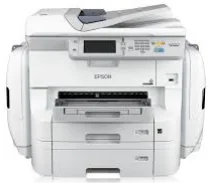
The Epson WorkForce Pro WF-R8590 model is another professional printer model that uses the PrecisionCore 45 print head with 4-color inkjet technology. It also uses a replaceable ink pack system (RIPS), one of the unique features that set the printer model apart. Its compatible printer languages are Epson ESC/P-R, PCL 5 emulation, PCL 6 emulation, and Postscript 3. Simultaneously, the minimum ink droplet size is as small as 2.8 picoliters (pl) with three different droplet sizes.
This combo package contains
- Standard Printer Driver
- Scanner Driver and EPSON Scan Utility
- EPSON Scan OCR Component
- Document Capture Pro
- Fax Utility
- Software Updater
- Network Installer
Epson WorkForce Pro WF-R8590 Drivers for Windows
40816445f418e4ee880350379d4c95254cd7b7366f343e37550c9dafe37d2b4f9afe4de870fb3e2891cb1be3b9dbede2185855161375a7366fb34d92520de373bd092a926588703516369a82e3450fe25cf25fa0f4278ea74b7820fc677ce073b2cb4b02525ba61630ba2727312255b4e7d55d28cad60c61d0b0608fe4b2c38bb52ca99fbc68943c73d5b2159522b0a9bd41eb7b799432236863c978f8b4245458565be6f2e3b5c3a5cc0cc7945c97600ac572c11c7bbb5af15778b4d5145b53063158b2314decee37e00926172b2a370211ae6653d7ff8ce750b1bacf461cbebd2640156743760f024eb52886c38cc01c824006cdc84f0d92b69e9206296f7aedbcf7b82a98dd04a5504a67a48fd54ab2f6486fd6289aae7f5985338e720282fd256d5e51af04462480d00194315422295803545589989dfe2c6d89355a1a0675fa11df59edbd6d75a4dc145e79beed7eac7646c28ef97f5b65af502a4580adfc0d76137cd71b606542338780c8bc3d6b4f38e9f1f53aa70bf39fcc25726680991c53a7931f70fc330591b29342a09727909152da3e36797015f303ddb4ce6882a74c48e83f6c377d04302af9976719a1b6200747ab7a5574f629954f544611f6f847ae7efaec123ea9ca325dbded6bc18021b113442c975358ef73bd6b8b26Epson WorkForce Pro WF-R8590 Drivers for macOS
3bd9ce104a4b1ee554846e8cebba9ce06ca67a81804fd1178869ffdc4bcbb8f58e39e71e37f25cbc43e8c1756c5de18a00bb96764ad618329e1fd88328c004b2de62910af45acfd91a1cb15842c1da97e45e80e13ab45d4fc600887351bb0b752ae6494617cce76cba3976d31bc88ba9dfef256e0cfcfcbabae7350aa42ef4163c8ba59ecc5e93e780b3e7c5b9fef9ad186c452f92975a8da85230e86814e3e33dee4cd767cb069e2dbe84397f91aebd12061a2181f517a59a28efa52ed0b1e2b7504dcf9f6267861acbe7e30f563bef36677dfa1ca356deaf4a704214d33821319026e445ea179b27455527a34f991c0727f85cca0ee32f76c6d5a4406a2a823d65f832e1c8ae053c217f94ac0d7490bd78d524f14908c36eeb8b7176cf3a2a7d481c32e880d73d620c40fdd69c4bbc73524cac5cf34104797b8e98ed7aad2aEpson WorkForce Pro WF-R8590 Specifications
As a multifunction device, the Epson WorkForce Pro WF-R8590 model can also print, copy, scan, send or receive fax messages. It also belongs to the Workgroup laser printer categories, which implies the work they can produce. In terms of the printer speed, the machine can make its first page of either black or color in just 7 seconds. The standard ISO/IEC print speed is up to 24 pages per minute (ppm).
It also runs in the duplex or double-sided printing with a rate of 16 ppm for both monochrome and colored documents. Simultaneously, this machine’s maximum printing speed at the normal mode is up to 34 ppm for either colored or monochrome documents. However, this machine’s optimum print capacity is up to 75,000 pages at the maximum yield. Similarly, the Epson WorkForce Pro WF-R8590 model’s optimum print resolution is up to 4800 x 1200 dots per inch (dpi).
In copying, Epson WorkForce Pro WF-R8590 can copy documents at 22 copies per minute for black and 21 ppm for colored documents. The maximum copy size is the A3 standard size, while it can produce a complete copy resolution of 600 x 1200 dpi. It can also reduce the output size by 25% or enlarge it by up to 400% with an auto-fit feature while working.
Technical Details
| Title | Epson WorkForce Pro WF-R8590 Drivers |
|---|---|
| Device Type | All-in-one printer |
| Driver Version | Varies by driver and operating system |
| Available Downloads | Drivers |
| License | Free |
| Manufacturer | Seiko Epson Corporation |