
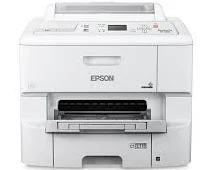
Using the Epson WorkForce Pro WF-6090 printer model ensures printing through the PrecisionCore 4S print head technology with a 4-color inkjet. More so, it can produce an optimum print resolution of up to 4800 x 1200 optimized dots per inch (dpi). Also, the print speed is according to the ISO standard print work. For instance, both the black and color pages print at a rate of 24 pages per minute (ppm).
This combo package contains
- Printer Driver
- Epson Software Updater
Epson WorkForce Pro WF-6090 Drivers for Windows
fc4962f5cd9a446c9a3150196ab86aba2e47c3e04d40d106b0d9ec8e3199c2a8bbcd8f8de7bea37d76d9ce0490171f81fe1eb2a867516e023c3cddef9e090192063158b2314decee37e00926172b2a370211ae6653d7ff8ce750b1bacf461cbe665e13b972122712cdfe7ab3806f6bc177b864ae4b02c18e71b1f12099acfb4f21bb4cef9b0989ed8047f142140f9673f280bee25ebbbe359a5c5c478f1821534ea03f3dece9a51aa79f6760d3f2cd1ae4c0a5a173c88d08c14b6c51276e1c376d6c589c47a975b91f3e0e6c08308ed8a077afe3b2e5f623bdb2fb3aabf60d11bf8a9a4861b192079883492b90330c294d7e1852770dd4c46a032e2fc72d96298d3165b46dca8175ca9c2f6ff925a953c511a720e39953e975e01d97505b7321a0264b53af910df783d40db8a6fa0ff41f911a30c5cf729f9098b60fc398da1b9b1ccc23e5988a092e4abb683f8b7ee738d55c537f8f4b732cadf71de8aac884116307422980c540470cc8ee11301e6cff7662d3f8029693e5627a6ae0081f7fEpson WorkForce Pro WF-6090 Drivers for macOS
11a91f993c75fc2194c2255e6aebdabf3c6435835b54b3a6dae50db2cda5792a731bf8319b2e7034e4ae9103bdf7339fe71d6960893ef0da418c9215e3fb90a31b15db462abcf17ee5f4560e9d5448aef843fdfbe6c51bdd159838ef8c2ee83f03e7a0cce9935c547e3df12c23c2c904c4ec62921a926537478b2fdbc82d2aee80144133b3db75ecd37a37e1bbf86bd166f6748cc2626e6f5376e87e78eb78033d65f832e1c8ae053c217f94ac0d7490bd78d524f14908c36eeb8b7176cf3a2aEpson WorkForce Pro WF-6090 Specifications
On the other hand, 2-sided printing at the same standard mode has a print rate of 16 ppm for both black and color pages. Furthermore, the first page out time is about 7 seconds, while the first set comes out in about 14 seconds. The maximum draft print speed is about 34 ppm for both color and black documents. It also has a minimum ink droplet size of about 3.7 picoliters (pl) from the machine’s three different droplet size variants.
The device’s compatible ink type is the DURABrite Pro pigment ink, which is smudge, fade, and water-resistant. It also supports cyan, yellow, black, and magenta colors through 4 individual ink cartridges. The replacement ink cartridges include 748 standard capacity that can print 2500 pages in black and 1500 color pages at the best performance. It is also compatible with the 748XL high capacity cartridge that can produce 5000 pages in black and 4000 pages in color.
The Epson WorkForce Pro WF-6090 printer model can also use the 748XXL Extra high-capacity print cartridge to print 10000 pages in black and 7000 pages in color. Concerning the device’s physical dimensions, the printer has a width of 18.8 inches and a height of 21.3 inches. According to standard measurements, the machine’s depth is about 29.8 inches, while the net weight is about 50.7 lbs.
Technical Details
| Title | Epson WorkForce Pro WF-6090 Drivers |
|---|---|
| Device Type | Printer |
| Driver Version | Varies by driver and operating system |
| Available Downloads | Drivers |
| License | Free |
| Manufacturer | Seiko Epson Corporation |