
Printer Drivers » Drivers » Printer » Epson » Epson WorkForce Pro WF-4730 Driver Download

Epson WorkForce Pro WF-4730 Driver Download

Epson WorkForce Pro WF-4730 Driver

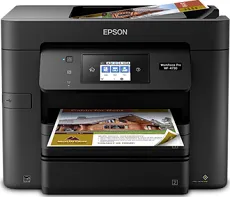
Some of the Epson WorkForce Pro WF-4730 printer model’s outstanding features include its PrecisionCore Heat-Free for laser printing exceptional performance. It can also print documents at 20 pages per minute (ppm) at the ISO standard mode. On the other hand, the print rate at the duplex printer mode is about 12 ppm for the same ISO mode. The minimum ink droplet size is approximately 2.8 picolitres (pl). When you print with this machine, you can be sure that the document will last up to 84 years before fading.

Epson WorkForce Pro WF-4730 Driver for Windows

Supported OS: Windows 11 (64-bit), Windows 10 (32-bit), Windows 10 (64-bit), Windows 8.1 (32-bit), Windows 8.1 (64-bit), Windows 8 (32-bit), Windows 8 (64-bit), Windows 7 (32-bit), Windows 7 (64-bit), Windows Vista (32-bit), Windows Vista (64-bit), Windows XP (32-bit), Windows XP (64-bit)
Drivers and Utilities Combo Package Installer for Windows 32-bit and 64-bit(Recommended)
Supported OS:Windows 11, 10, 8.1, 8, 7, Vista 32-bit and 64-bit
12.06 MB
Drivers and Utilities Combo Package for Windows 32-bit and 64-bit(Recommended)
Supported OS:Windows XP 32-bit and 64-bit
227.82 MB
Printer Driver for Windows 32-bit
Supported OS:Windows 10, 8.1, 8, 7, Vista, XP 32-bit
37.75 MB
Printer Driver for Windows 64-bit
Supported OS:Windows 11, 10, 8.1, 8, 7, Vista, XP 64-bit
41.96 MB
Scanner Driver and Epson Scan 2 Utility for Windows 32-bit and 64-bit
Supported OS:Windows 11, 10, 8.1, 8, 7, Vista, XP 32-bit and 64-bit
25.42 MB
Remote Print Driver for Windows 32-bit
Supported OS:Windows 10, 8.1, 8, 7, Vista, XP 32-bit
8.99 MB
Remote Print Driver for Windows 64-bit
Supported OS:Windows 11, 10, 8.1, 8, 7, Vista, XP 64-bit
9.69 MB

Driver and Software for Mac OS

Supported OS: macOS Sonoma 14, macOS Ventura 13, macOS Monterey 12, macOS Big Sur 11, macOS Catalina 10.15, macOS Mojave 10.14, macOS High Sierra 10.13, macOS Sierra 10.12, OS X El Capitan 10.11, OS X Yosemite 10.10, OS X Mavericks 10.9, OS X Mountain Lion 10.8, OS X Lion 10.7, Mac OS X Snow Leopard 10.6, Mac OS X Leopard 10.5
Drivers and Utilities Combo Package Installer for macOS
Supported OS:macOS 10.15 to 13
6.24 MB
Drivers and Utilities Combo Package Installer for macOS
Supported OS:macOS 10.7 to 10.14
14.99 MB
Printer Driver for macOS
Supported OS:macOS 10.6 to 14
91.76 MB
Scanner Driver and Epson Scan 2 Utility for macOS
Supported OS:macOS 10.6 to 14
43.12 MB
Remote Print Driver for macOS
Supported OS:macOS 10.6 to 14
24.82 MB
Remote Print Driver for macOS
Supported OS:macOS 10.5
24.14 MB

Specifications

This rate also applies to both monochrome and color document printing. The Epson WorkForce Pro WF-4730 machine also produces budget-friendly products, reaching up to 50% lower printing costs than color laser production. The compatible ink type is the DURABrite Ultra pigment ink, which comprises four different individual cartridges. The 802 standard capacity yield is about 900 sheets of black documents and 650 sheets of color documents.

The machine’s main input tray can also accommodate up to 500 sheets of plain paper, which means users will replace pieces less often. It is also responsible for extraordinary efficiency through a high powered system with compact space-saving print components. To enhance the machine’s productivity, it also has an additional paper supply through an automatic document feeder (ADF) that can hold 35 plain paper sheets.

Another extra incentive for the printer users includes mobile printing features through iPhone, Android tablet, and smartphone print support. This effect’s internal print features include the WI-Fi Direct connection and a Near Field Communication (NFC), and an Ethernet cable connection. The machine interfaces display component also comprises an intuitive 2.7 inches color diagonal display with a liquid crystal display (LCD) to manage and control the device. Download Epson WorkForce Pro WF-4730 driver from Epson website