
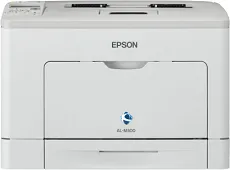
The Epson WorkForce AL-M300DN model’s expected printing resolution is up to 1200 x 1200 dots per inch (dpi). Simultaneously, it uses the AcuBrite toner system, which produces the optimum yield quality at great speed. The machine is also an office workgroup device with many fascinating features that increase its value. In terms of the printing speed, monochrome or black and white printing runs at the rate of 35 pages per minute (ppm).
Epson WorkForce AL-M300DN Drivers for Windows
ea5c4b0c477c43d1ff9a9929d6fbc797e161e3e5dc8ae23312e77b62e6e32c22bfb7dab86eef4d009dc2fe6fd5b932b084727d37ef727f0f1dd65d86269e61effbdd42992f97fb9fe2f31cc219d020e5eed1e548a634e4f3b5735f03a95115223dc25adc87643d013ee1eb0cb0414ba45da098925d298dcf4a8549bd76cbde4d16b6f9e839db41defc2a36dd892fa3dcaab4337e4c9af93eebc62e0497811fd4Epson WorkForce AL-M300DN Drivers for macOS
9f6dae50f6c1472331fbf8c5a4b16b77f74e8456a81fefee4acb3bdd0b46d41690071b11984600791b1ab1b58f654ee83a3a90fed5e5b6be2162f41461badfc7cbc2fd231e1bd209a1758401486de586ac74ff7cb96e1638d6f6d45f6c6c3b3fEpson WorkForce AL-M300DN Specifications
However, this rate applies to the single-sided printing mode. On the other hand, double-sided printing mode allows a speed of 21 ppm. The first page takes about 6 seconds, while it takes up to 18 seconds to warm up and be ready to print. In a month, Epson WorkForce AL-M300DN can produce up to 100,000 pages of high-quality prints. It can connect through several interface options, including the USB 2.0 hi-speed port with a type B component and a Gigabit Ethernet interface.
The machine supports paper formats such as A4, A5, B5, A6, C6, CL, and #10 envelopes under paper handling. Others include the letter, legal, executive, F4, monarch, photo paper sizes, and custom sizes. It can also have a separate duplex printing mode for working on both sides of the paper page as a top-quality printer. The compatible paper weight ranges between 60 and 216 gsm, while the standard paper input capacity is up to 300 sheets of plain paper.
The machine has a multipurpose tray that can hold up to 50 plain paper sheets. There is also an extra paper tray that can accommodate 250 plain paper sheets. In other words, there are two main trays in this machine, and there is an optional tray as well. On the other hand, the output tray will supply up to 150 sheets of plain paper.
Technical Details
| Title | Epson WorkForce AL-M300DN Drivers |
|---|---|
| Device Type | Printer |
| Driver Version | Varies by driver and operating system |
| Available Downloads | Drivers |
| License | Free |
| Manufacturer | Seiko Epson Corporation |