
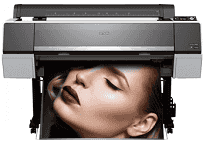
Epson SureColor P9000 is a large format professional printer that can deliver accurate color reproduction and print quality for a working photographer and graphic designer. This printer, well-equipped with a 44-inch space, prints gallery-quality photos through the advanced Epson UltraChrome HDX inks, providing a wider color gamut and contrast ratio. The correct driver installation activates much of the printer’s potential, such as color calibration, media handling, and maintenance functions. With our complete driver installation set up for Windows, Mac, and related operating systems, installation could not be more straightforward. This is so that you can enjoy all the right benefits from a truly worthwhile investment, with a consistent and neat professional finish for all your projects.
Epson SureColor P9000 Drivers for Windows
057197f9c65813dd0a90dc09f658580678090a230ab864a64e6500b1c7cb06b2d21babb3c088d84f3c0ba77c9e97ec8a6f4fabbc8e06be5002b8a69dc51988366260fddae240ec8d6bfd878bada828febe1e20de221c58feae4ea44609dc2195Epson SureColor P9000 Drivers for macOS
6c8640175d3b79132fb859e7ec158d13bb9228472ce130e5c8c388b7f859a215048b702f09a0ec3d8cce6ecec5dca2ed21d016ce0b66e275e17a5ad0597000b4Epson SureColor P9000 Windows Driver Installation Process
This Windows version driver package for the Epson SureColor P9000 is entirely compatible with all versions of Windows starting from 10, 8.1, down to 7 in both 32- and 64-bit versions. The installation is a no-brainer: download the latest driver and all other utilities. It has the popular Epson Print Layout software and advanced color management. The installation wizard walks you through the entire process, including printing by USB, Ethernet, or a wireless network configuration that will detect your P9000 on a proper connection. As a part of the installation, this pack will also install the Epson Printer Utility. Which will allow users to access nozzle checks, head alignments, and so on from their computers. However, you have to use the color calibration tool that came with the software.
Mac OS Compatibility and Features
The Epson SureColor P9000 driver for Mac is the best choice for macOS Monterey, Big Sur, Catalina, or any other version below that prevails in compatibility challenges with M1/M2 processors compared to Intel-based Macs. The Mac driver package is tied closely to the work of color professionals in color-critical artworks to support all users of Adobe Creative Suite applications. Printer and configuration queues are automatically set up for multi-user environments using the tried-and-true package installer format on Mac systems. As per the Mac version, there will be a ColorSync driver that is color-consistent from the stage of color processing, from capture to displays, and then applied. Like Mac’s other highly attractive features, this one is bundled in this Epson Media Installer utility software, allowing one to set up and create their own paper types with feeding settings and color profiles.
Advanced Driver Features and Troubleshooting
The Epson SureColor P9000 driver tools can work for functions beyond inkjet printing. Non-trivial layout applications are available for multi-image outputs, along with time and cost accounting for ink and media consumption. Advanced color management professionals can choose between Epson PreciseColor technology or an out-of-the-box custom ICC profile workflow paid for by spectrophotometer based calibration devices. Available to the user are elaborate controls on paper handling ranging from platen gap adjustments and paper suction settings to drying time configurations for special media types. Our complete troubleshooting support package has been added to remedial measures for common issues like print head alignment, color banding, and connectivity problems. Furthermore, the updated drivers are compatible with the latest operating systems while boosting efficiency and ensuring all expanded media is supported in this professional printing system.
Technical Details
| Title | Epson SureColor P9000 Drivers |
|---|---|
| Device Type | Printer |
| Driver Version | Varies by driver and operating system |
| Available Downloads | Drivers |
| License | Free |
| Manufacturer | Seiko Epson Corporation |